
Implementing Document Processing
A step-by-step guide to upload, process, and verify user documents via API.
This guide walks you through the lifecycle of a Document Collection. By following these steps, you will learn how to programmatically manage users, upload files, monitor their AI-categorization status, and finalize them to generate actionable Truv Links.
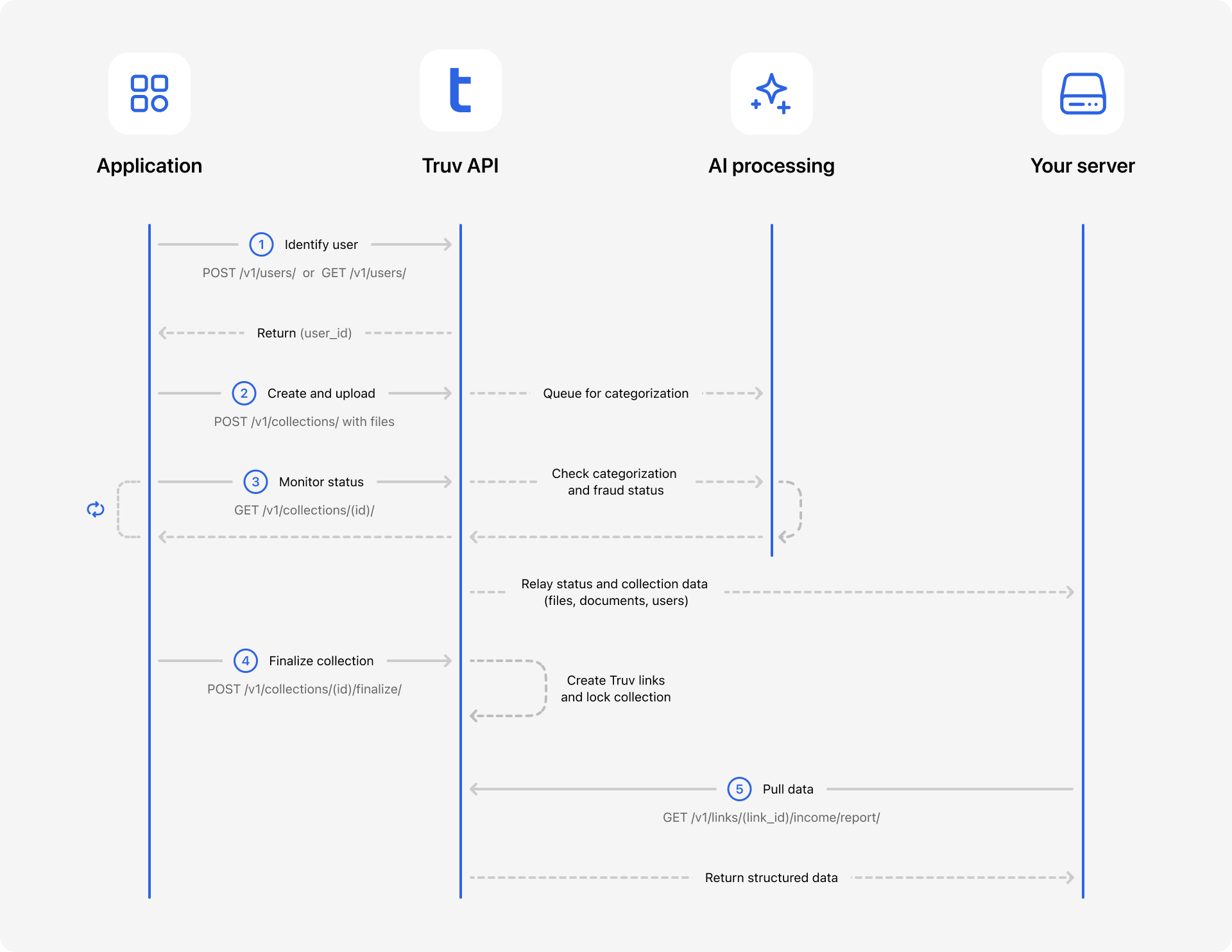
The Workflow at a Glance
- Identify User: Retrieve an existing
user_idor create a new user. - Create & Upload: Initialize a container for that user's documents and add documents (PDFs, images) to the collection.
- Monitor Status: Poll the collection to verify validation and AI categorization.
- Finalize Collection: Confirm valid documents to generate Truv Links.
- Pull Data: Fetch the final Income or Employment report.
Step 1: Identify or Create a User
If AIM Check will be used, ensure at least the last 4 digits of the users SSN have been added during user creation
Before you can upload documents, you must associate them with a specific Truv User. You need a valid user_id to initialize a collection. You have two options:
Option A: Find an Existing User
If the user already exists in your Truv system, search for them to retrieve their id.
- Endpoint:
GET /users/ - API Reference: List all users
Option B: Create a New User If this is a new applicant, create a user profile first.
- Endpoint:
POST /users/ - API Reference: Create a user
Response: Save the id returned from either request (e.g., user_12345). You will use this in the next step.
Step 2: Create a Document Collection
Once you have the user_id, create a Collection. This acts as the container for all documents related to that specific user.
-
Endpoint:
POST /collections/ -
API Reference: Create a new document collection
You must pass the
user_idin the request body. You can also upload your first file immediately in this request or all of your files at once if available.Files should be passed thorough into the
contentkey/value pair Base64-encoded. Some test files Base64-encoded are available here to get you started.{ "documents": [ { "mime_type": "application/pdf", "filename": "most.recent.paystub.pdf", "content": "{{most_recent_paystub}}", "user_id": "{{user_id}}" }, { "mime_type": "application/pdf", "filename": "next.recent.paystub.pdf", "content": "{{next_most_recent_paystub}}", "user_id": "{{user_id}}" } ] }Response: The API returns a
collection_id. Save this ID for all subsequent operations.
Step 3: Add Files Incrementally (Optional)
If you need to add more files after the initial creation (e.g., a "save and resume" workflow), use the specific files endpoint.
- Endpoint:
POST /collections/{collection_id}/files/ - API Reference: Upload files to existing collection
{
  "documents": [
    {
      "mime_type": "application/pdf",
      "filename": "paystub.pdf",
      "content": "{{first_paystub}}",
			"user_id": "{{user_id}}"
    }
  ]
}
Step 4: Monitor Processing Status
Document processing is asynchronous. You must monitor the collection to verify that files have been successfully uploaded, validated, and categorized by the AI.
-
Endpoint:
GET /collections/{collection_id}/ -
API Reference: Get document collection details
Poll this endpoint to inspect the results. The response separates raw files from recognized documents:
uploaded_files: Shows technical validation on the files that have been uploaded to the collection (is the file readable? is it a supported type?).documents: Shows the AI-recognized content (e.g., a "PAYSTUB" found within the file) and ultimately the processed files that can be used for finalization.{ "collection_id": "f1f63754e72a44b4805a4d16380cd833", "uploaded_files": [ { "file_id": "9efadd7fb43c4598b02fe79bd7e31fd7", "filename": "next.recent.paystub.pdf", "mime_type": "application/pdf", "validations": { "is_valid": true, "is_unique": true, "is_readable": true, "is_accessible": true, "is_viable_size": true, "is_supported_type": true }, "status": "successful", "user_id": "c87e695081704310b15d59ee1640b1aa", "external_user_id": "345446" }, { "file_id": "687371688444469b8ed5130cac085909", "filename": "most.recent.paystub.pdf", "mime_type": "application/pdf", "validations": { "is_valid": true, "is_unique": true, "is_readable": true, "is_accessible": true, "is_viable_size": true, "is_supported_type": true }, "status": "successful", "user_id": "c87e695081704310b15d59ee1640b1aa", "external_user_id": "345446" } ], "documents": [ { "document_id": "b1091a2ddc5d428c9c8af66dbc8b0556", "file_id": "9efadd7fb43c4598b02fe79bd7e31fd7", "document_type": "PAYSTUB", "document_subtype": null, "status": "successful", "first_name": "John", "last_name": "Doe", "user_id": "c87e695081704310b15d59ee1640b1aa", "external_user_id": "345446", "start_page": 1, "end_page": 1 }, { "document_id": "1cbb5f9bb6f345059af491917179c80b", "file_id": "687371688444469b8ed5130cac085909", "document_type": "PAYSTUB", "document_subtype": null, "status": "successful", "first_name": "John", "last_name": "Doe", "user_id": "c87e695081704310b15d59ee1640b1aa", "external_user_id": "345446", "start_page": 1, "end_page": 1 } ], "users": [ { "id": "c87e695081704310b15d59ee1640b1aa", "external_user_id": "345446", "first_name": "Sophia", "last_name": "Williams" } ], "created_at": "2025-12-12T17:21:43.791514Z", "updated_at": "2025-12-12T17:21:43.791524Z" }
Step 5: Finalize the Collection
Once documents show a status of successful, you must Finalize the collection to generate the Truv Link.
- Endpoint:
POST /collections/{collection_id}/finalize/ - API Reference: Finalize a collection
You can optionally specify individual
document_idsin this requestBody if you do not wish to incorporate all of the documents uploaded into the Collection in your finalization request. When omitted from your request, all documents uploaded to the collection will be use
{
  "product_type": "income"
}
{
"document_ids": [
"d1e2f3a4b5c6d7e8f9a0b1c2d3e4f5a6",
"d1e2f3a4b5c6d7e8f9a0b1c2d3e4f5a6"
],
"product_type": "income"
}Response:
Returns a links array with the link_id and the documents that were submitted for finalization. The link_id should be stored and used in subsequent requests
{
    "users": [
        {
            "id": "21ae68826be042e5ab410e531dc40889",
            "external_user_id": "531318",
            "links": [
                {
                    "link_id": "1995e2fc5e374beb955ae81276294815",
                    "status": "new",
                    "documents": [
                        {
                            "id": "ad568bb5c117439e9c00df738052c653",
                            "document_type": "PAYSTUB",
                            "document_subtype": null
                        },
                        {
                            "id": "769014511ed748d0a650a73759d06127",
                            "document_type": "PAYSTUB",
                            "document_subtype": null
                        }
                    ]
                }
            ]
        }
    ]
}
Step 6: Ensure Link Readiness & Retrieve Data
After finalization, Truv asynchronously processes the Link to normalize and extract the data. You must ensure this task is complete before fetching the report.
- Check Link Status You can track the status using one of two methods:
- Option A: Webhook (Recommended) Listen for the
task-status-updatedevent. Wait for a payload where thestatusisdoneand thelink_idmatches the one from Step 5.- Reference: Webhook Event: task-status-updated
- Option B: Polling Poll the Finalize Retrieval endpoint until the status returns done.
- Endpoint:
GET /collections/{collection_id}/finalize/ - Reference: Retrieve Finalization Status
- Endpoint:
- Option A: Webhook (Recommended) Listen for the
- Retrieve Verified Data Once the status is
done, use thelink_idto fetch the structured data or pull down as a pdf.