
Social Services Verifications
Use this guide to streamline eligibility determination using Truv for government agencies
Overview
Truv’s Verification of Income and Employment (VOIE) product helps government agencies and benefit administrators streamline eligibility insights for programs like SNAP, Medicaid, TANF, Child Care, LIHEAP, and more. By providing secure, real-time access to verified income and employment data from authenticated sources, Truv enables faster and more accurate eligibility decisions.
Key Benefits
With comprehensive employment and income from trusted sources, agencies can
- Automate eligibility determinations with real-time data,
- Reduce manual paperwork,
- Verify financial resources for Users (Recipients) of all types, including W-2, self-employed and gig-economy (1099), retirement and disability payments, and financial assistance from family and friends,
- Minimize usage of instant databases, and
- Accelerate access to critical benefits for individuals and families in need.
Follow the step-by-step guide below to use Truv Orders in your Customer Portal and Eligibility System for income, employment verification, and self-employment income verification
Summary of sequence diagram
The diagram below shows the overview of token and data exchanges. The sequence covers your Customer Portal, Truv Bridge, your server and backend, as well as the Truv API. View the Steps section to get started.
- Create an
orderfrom your backend. In the response there will be abridge_tokento initiate the Truv Bridge. - Initialize Truv Bridge in your Customer Portal and pass the
bridge_tokento TruvBridge.init. - Listen to the onSuccess and onClose callbacks from the order page to learn when a user has completed connecting their accounts.
- After the connections are initiated, webhook events begin to arrive.
- Make an API request to retrieve the order and fetch the data and reports.
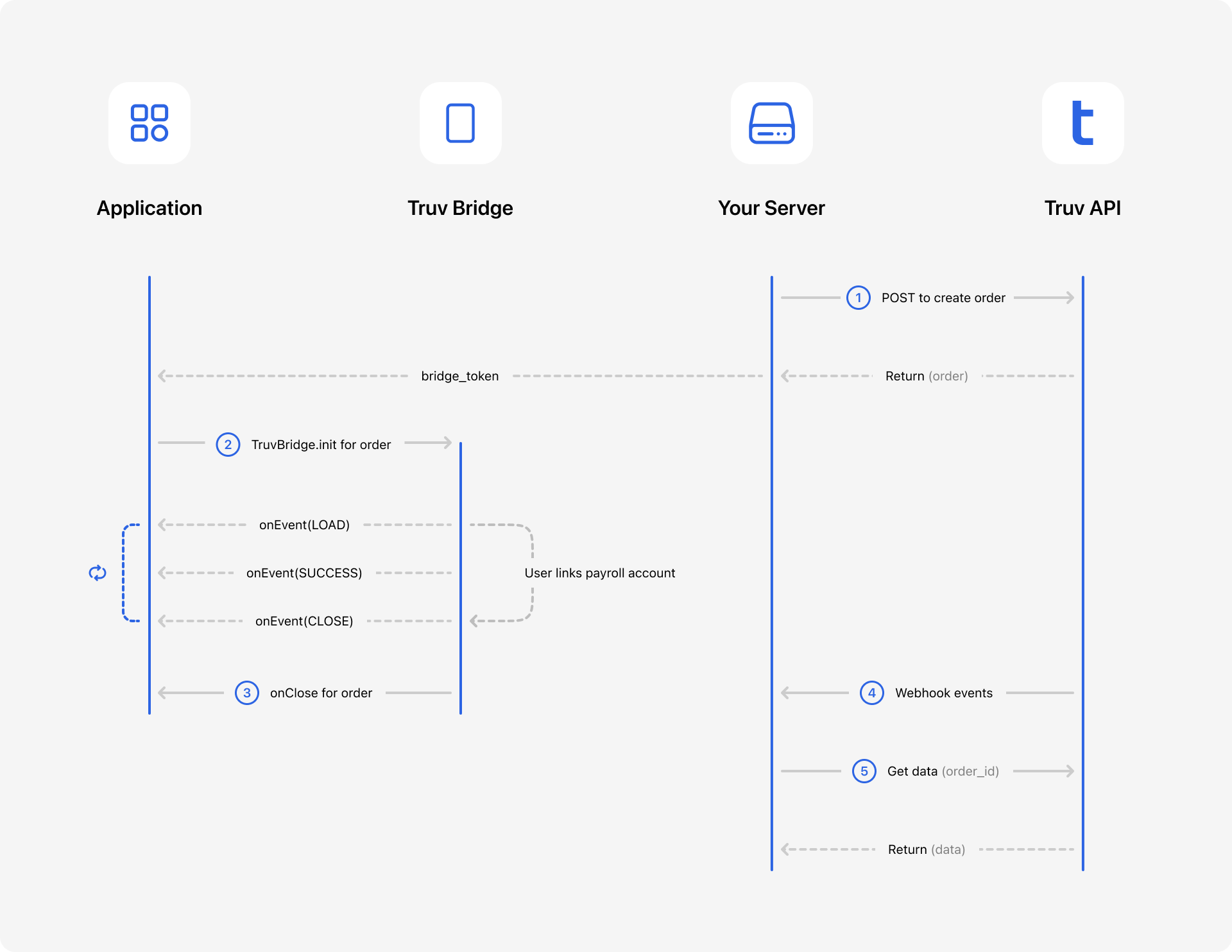
Recipient can connect multiple employments or financial accounts.
Authentication
NoteRequests to Truv APIs must use HTTPS with TLS 1.2v encryption or higher.
All API requests require the X-Access-Client-Id and X-Access-Secret headers. These contain your Client ID and Access secret. These values are in your Truv Dashboard.
WarningThe Client ID and Access secret may allow access to sensitive information. Store these in a secure and private place.
For API requests, the base URL https://prod.truv.com/v1/ is the same in each environment. Update the access key with the prefixes below for use with their respective environments.
sandboxdevprod
Steps
The steps below cover each action for setting up your Truv workflow.
1. Create an Order and a Bridge Token
Create an Order in the Truv backend to link different data providers. See the sample cURL request below.
curl --request POST \
     --url https://prod.truv.com/v1/orders/ \
     --header 'X-Access-Client-Id: {{client_id}}' \
     --header 'X-Access-Secret: {{access_key}}' \
     --header 'accept: application/json' \
     --header 'content-type: application/json' \
     --data '
{
  "first_name": "John",
  "last_name": "Doe",
  "ssn": "991919991"
  "products": [
    "income"
  ]
}
'
Retrieve a bridge_token from the API response. View the response sample below:
{
  "id": "39aa1486ccca4bc19cda071ffc1ba392",
  "products": [
    "income"
  ],
  "first_name": "John",
  "last_name": "Doe",
  "user_id": "99dd17074ac94aa9ace2621d657c7610",
  "bridge_token": "e4100fccdae94691b4414c7306220c06",
...
}
NoteFor self-employed Recipients, you'd create Order and pass
productsasassetsto allow Recipients to connect their primary financial institution instead of employer or payroll provider portal.Document upload is a Truv configuration and can be turned on easily in a few seconds. Truv Document upload solution will be returned as
"products": "income"with"data_source":"docs"in the JSON response.
2. Initiate Truv Bridge
Using the Bridge Token, initialize the Truv Bridge in your gateway platform interface. Follow the example below and pass the Bridge Token to TruvBridge.init.
Important
isOrderis a required for using the Truv Bridge with embedded orders and must be set totrue. Initializing the bridge withoutisOrder: truewill result in unexpected behavior and poor user experience.
<script src="https://cdn.truv.com/bridge.js"></script>
<script>
  // Step 2 - Call backend to retrieve a bridge_token from Truv
  const bridgeToken = <%= Value returned by API call to create an order %>

  // Step 3 - Initialize Bridge
  const bridge = TruvBridge.init({
    isOrder: true,
    bridgeToken: bridgeToken,
    // Optional properties
    position: { type: 'inline', container: HTMLElement }, // Or { type: 'dialog' }
    // Optional callbacks
    onLoad() {},
    onEvent(type, payload, source) {},
    onClose() {},
    onSuccess() {}
   })
</script>
Callbacks
The functions in this table cover specific actions.
| Callback | Description | Required |
|---|---|---|
| onLoad | Truv Bridge has finished loading the order page | optional |
| onEvent | Truv Bridge received an event from the order page or the connection widget | optional |
| onClose | Truv Bridge closed the order page | optional |
| onSuccess | User has successfully connected all accounts and clicked the "I'm done" button | optional |
Events from the order page
Payload format for the events:
{
   "type": "LOAD",
   "source": "order" | "bridge" // Indicates if this even if on the order page or connection widget
   "payload": {}, // Only present for source=bridge
}
Four options are supported for the order page events with "source":"order":
onEvent('CLOSE', undefined, 'order')      // Fires same time as onClose()
onEvent('LOAD', undefined, 'order')       // Fires same time as onLoad()
onEvent('SUCCESS', undefined, 'order')    // Fires same time as onSuccess()
onEvent('COMPLETED', undefined, 'order')  // Fires on final state (success or skipped)
Events from the connection widget
For all connection widget event types and payloads with "source":"bridge", refer to Event Reference For Truv Bridge
onEvent(bridgeEventType, bridgeEventPayload, 'bridge');Position
Determines how the embedded order page is displayed. The default type is 'dialog'.
{ type: 'dialog' }. The bridge appears as a dialog window, which overlays the rest of the interface and disables scrolling.{ type: 'inline', container: HTMLElement }. The embedded order page is integrated within an existing element, allowing the interface to function without blocking the rest of the interface or global scrolling. However, it's crucial to ensure that your interface functions seamlessly across various devices, particularly on mobile devices such as iPhones and Androids, including compatibility with virtual keyboards.
const bridge = TruvBridge.init({
  bridgeToken: '<token>',
  isOrder: true,
  position: {
    type: 'inline',
    container: document.querySelector('#inline-order-container')
  }
});
WarningThere are a few important requirements when using the inline position
- The container element must remain stable while the bridge is open. This means the container and all its parent elements must not be unmounted or moved to a different parent node.
- You must manually close the bridge before removing the parent container — for example, when navigating to another page in a single-page application without a full reload.
- Only one bridge instance can be open on the page at a time.
More adjustments
Our support team can also:
- Remove Close and Done buttons
- Change how Truv Bridge for each connection is launched — outside the container, fullscreen modal
- Enable the auto-height feature for the inline embedded order to help prevent double scrollbars in certain layouts.
3. Test Credentials
Test your implementation using sample credentials. Refer to Testing or view the sample usernames and passwords below.
| Username | Password | Description |
|---|---|---|
| goodlogin | goodpassword | Full time current employment |
| hourly.part-time | goodpassword | Hourly part-time worker |
| multiple.employments | goodpassword | Multiple employments with different employers |
| goodlogin.shift | goodpassword | Gig worker |
| goodlogin | goodasset | Successful login to financial account with only 30 days' of data returned |
4. Monitor webhooks
Webhooks to your server can help monitor and notify you of any connection attempts with Task status changes. Use user_idto match the webhook events with a specific order.
{
  "webhook_id": "17a80437ce23411dbfd656694d19a8c6",
  "event_type": "task-status-updated",
  "event_created_at": "2024-07-11T21:43:08.073930Z",
  "product": "income",
  "link_id": "d8a8945ee2b049b193110cfba643f5df",
  "user_id": "adbe707dddee4334bffaeb5866272740",
  "data_source": "payroll",
  "task_id": "871fef2e79ea444ea2019c8845305d31",
  "tracking_info": null,
  "status": "parse",
  "template_id": null,
  "updated_at": "2024-07-11T21:43:08.075540+00:00"
}
Once the Recipient finishes connecting any of their accounts the order level webhooks will be initiated:
{
  "webhook_id": "0aac461e7b774a38a72fd9c7c0eef8ee",
  "event_type": "order-status-updated",
  "event_created_at": "2024-07-11T21:40:48.424610Z",
  "product": "income",
  "link_id": "d8a8945ee2b049b193110cfba643f5df",
  "user_id": "adbe707dddee4334bffaeb5866272740",
  "data_source": "payroll",
  "order_id": "ddd192646b3c48be96651a0ff25cef85",
  "order_number": "4138538",
  "employer_id": "d7166cffbfef4bd6a9e830cf5508e615",
  "status": "completed",
  "template_id": null,
  "updated_at": "2024-07-11T21:40:48.424655+00:00"
}
5. Retrieve data
Use the permanent order_id to retrieve order details which will contain the data from all linked accounts The JSON data below contains a sample payload.
{
  "id": "39aa1486ccca4bc19cda071ffc1ba392",
  "products": [
    "income"
  ],
  "source": "sample-gateway-platform",
  "order_number": "1534332",
  "custom_field": "string",
  "first_name": "John",
  "last_name": "Doe",
  "user_id": "99dd17074ac94aa9ace2621d657c7610",
  "bridge_token": "e4100fccdae94691b4414c7306220c06",
  "share_url": "https://cdn.truv.com/employment.html?bridge_token=63b4af88facb40e48f517c1e8c7abdf4&order_group_id=39aa1486ccca4bc19cda071ffc1ba392",
  "created_at": "2021-04-21T21:45:14.418542Z",
  "updated_at": "2021-04-21T21:45:14.418542Z",
  "canceled_at": "2021-04-22T21:45:14.418542Z",
  "expired_at": "2021-04-24T21:45:14.418542Z",
  "is_expired": true,
  "initial_order": "f5dc0239e2094dbc90ab2edc1918a9df",
  "refresh_order": "9b96606355b94e8abff8ed8d75aa2027",
  "employers": [
    {
      "id": "ad9f14440d624ec3b0f66e81e44518c7",
      "product_type": "income",
      "status": "pending",
      "suborder_number": "133982343355",
      "created_at": "2021-04-21T22:12:59.346109Z",
      "bridge_token": "e4100fccdae94691b4414c7306220c06",
      "link_id": "e4100fccdae94691b4414c7306220c06",
      "access_token": "e4100fccdae94691b4414c7306220c06",
      "pdf_report": "https://citadelid-resources.s3-us-west-2.amazonaws.com/report.pdf",
      "data_source": "payroll",
      "provider": {
        "id": "truv_api",
        "name": "Sandbox Provider",
        "logo_url": "https://citadelid-resources.s3.us-west-2.amazonaws.com/providers/truv-blue.svg"
      },
      "is_suspicious": true,
      "start_date": "2019-08-24",
      "end_date": "2019-11-27",
      "company_name": "Facebook Demo",
      "company_address": {
        "street": "1 Hacker Way",
        "city": "Menlo Park",
        "state": "CA",
        "zip": "94025"
      },
      "company_domain": "facebook.com",
      "employments": [
        {
          "income": "15000.00",
          "income_unit": "YEARLY",
          "pay_rate": "1250.00",
          "pay_frequency": "M",
          "statements": [
            {
              "id": "24d7e80942ce4ad58a93f70ce4115f5c",
              "check_number": "29205182",
              "pay_date": "2024-05-15",
              "net_pay": "1500.32",
              "net_pay_ytd": "3450.00",
              "gross_pay": "1250.11",
              "gross_pay_ytd": "3750.00",
              "bonus": "25.00",
              "commission": "0.00",
              "hours": "80.00",
              "basis_of_pay": "S",
              "period_start": "2018-05-01",
              "period_end": "2024-05-15",
              "regular": "1200.00",
              "regular_ytd": "3600.00",
              "other_pay_ytd": "75.00",
              "bonus_ytd": "75.00",
              "commission_ytd": "0.00",
              "overtime": "25.00",
              "overtime_ytd": "75.00",
              "other_pay": "25.00",
              "earnings": [
                {
                  "name": "Regular",
                  "amount": "1200.00",
                  "category": "regular",
                  "rate": "15.00",
                  "units": "80"
                },
                {
                  "name": "Overtime",
                  "amount": "25.00",
                  "category": "overtime",
                  "rate": "18.75",
                  "units": "1.33"
                }
              ],
              "earnings_ytd": [
                {
                  "name": "Regular",
                  "amount": "3600.00",
                  "category": "regular",
                  "rate": null,
                  "units": null
                },
                {
                  "name": "Overtime",
                  "amount": "75.00",
                  "category": "overtime",
                  "rate": null,
                  "units": null
                }
              ],
              "deductions": [
                {
                  "name": "Federal Income Tax",
                  "amount": "40.00",
                  "category": "federal"
                },
                {
                  "name": "Social Security Tax",
                  "amount": "77.50",
                  "category": "socialsec"
                },
                {
                  "name": "Medicare Tax",
                  "amount": "18.13",
                  "category": "medicare"
                }
              ],
              "deductions_ytd": [
                {
                  "name": "Federal Income Tax",
                  "amount": "127.01",
                  "category": "federal"
                },
                {
                  "name": "Social Security Tax",
                  "amount": "232.50",
                  "category": "socialsec"
                },
                {
                  "name": "Medicare Tax",
                  "amount": "54.39",
                  "category": "medicare"
                }
              ],
              "md5sum": "03639d6a6624f69a54a88ea90bd25e9d",
              "file": "https://citadelid-resources.s3-us-west-2.amazonaws.com/paystub_sample.pdf",
              "derived_fields": [
                "basis_of_pay"
              ],
              "missing_data_fields": [
                "earnings_ytd"
              ]
            }
          ],
          "annual_income_summary": [
            {
              "id": "24d7e80942ce4ad58a93f70ce4115f5c",
              "year": 2024,
              "regular": "14400.00",
              "bonus": "300.00",
              "commission": "0.00",
              "overtime": "300.00",
              "other_pay": "0.00",
              "net_pay": "13800.00",
              "gross_pay": "15000.00"
            }
          ],
          "bank_accounts": [
            {
              "account_number": "1234567890",
              "routing_number": "123456789",
              "account_name": "My Bank",
              "account_type": "C",
              "deposit_type": "A",
              "deposit_value": "200.00",
              "bank_name": "TD Bank"
            }
          ],
          "w2s": [
            {
              "file": "https://citadelid-resources.s3-us-west-2.amazonaws.com/W2_sample.pdf",
              "md5sum": "f65e30c39124ad707ac4b3aeaee923a7",
               "year": 2024,
           		 "wages": "14750.00",
            	 "federal_tax": "400.00",
            	 "social_security_wages": "14750.00",
            	 "social_security_tax": "914.50",
            	 "medicare_wages": "14750.00",
            	 "medicare_tax": "213.88",
            	 "gross_pay": "14750.00"
            }
          ],
          "id": "24d7e80942ce4ad58a93f70ce4115f5c",
          "is_active": true,
          "job_title": "Cashier",
          "job_type": "F",
          "start_date": "2018-01-01",
          "original_hire_date": "2017-06-21",
          "end_date": null,
          "dates_from_statements": false,
          "derived_fields": [
            "is_active"
          ],
          "missing_data_fields": [
            "w2s"
          ],
          "manager_name": "Jenny McDouglas",
          "profile": {
            "id": "48427a36d43c4d5aa6324bc06c692456",
            "created_at": "2022-06-07T15:00:00Z",
            "updated_at": "2022-06-31T15:00:00Z",
            "first_name": "John",
            "last_name": "Doe",
            "full_name": "John Doe",
            "middle_initials": "K",
            "email": "[email protected]",
            "ssn": "123456789",
            "date_of_birth": "1992-03-03",
            "home_address": {
              "street": "1 Morgan Ave",
              "city": "Los Angeles",
              "state": "CA",
              "zip": "90210",
              "country": "US"
            }
          },
          "company": {
            "name": "Facebook Demo",
            "address": {
              "street": "1 Morgan Ave",
              "city": "Los Angeles",
              "state": "CA",
              "zip": "90210",
              "country": "US"
            },
            "phone": "6503087300",
            "ein": "12-345678"
          }
        }
      ]
    }
  ],
  "financial_accounts": [
    {
      "id": "ad9f14440d624ec3b0f66e81e44518c7",
      "product_type": "assets",
      "status": "pending",
      "suborder_number": "133982343355",
      "created_at": "2021-04-21T22:12:59.346109Z",
      "bridge_token": "e4100fccdae94691b4414c7306220c06",
      "link_id": "e4100fccdae94691b4414c7306220c06",
      "access_token": "e4100fccdae94691b4414c7306220c06",
      "pdf_report": "https://citadelid-resources.s3-us-west-2.amazonaws.com/report.pdf",
      "data_source": "financial_accounts",
      "provider": {
        "id": "truv_api",
        "name": "Sandbox Provider",
        "logo_url": "https://citadelid-resources.s3.us-west-2.amazonaws.com/providers/truv-blue.svg"
      },
      "is_suspicious": true
    }
  ],
  "template_id": "9b96606355b94e8abff8ed8d75aa2027",
  "voie_report_id": null,
  "voa_report_id": null,
  "aim_check_report_id": null
}
6. Self-Certification (Optional)
Truv supports an optional self-certification step where Recipients can review and certify the accuracy of their income and employment data directly on the order page. This feature is configurable — contact your Truv representative to enable it for your account.
When enabled, the order page presents a certification screen after the Recipient completes their connections. The Recipient reviews the retrieved data and confirms its accuracy before finishing.
To retrieve the certification results, use the Self-Certification Results endpoint:
curl --request GET \
     --url https://prod.truv.com/v1/orders/{order_id}/certifications/ \
     --header 'X-Access-Client-Id: {{client_id}}' \
     --header 'X-Access-Secret: {{access_key}}' \
     --header 'accept: application/json'
NoteSelf-certification results are only available for orders where the certification feature is enabled and the Recipient has completed the certification step.
Data Refresh and Re-verification
Data refresh order can be created using Order Refresh endpoint.
NoteDepending on the payroll system, Recipient authentication may expire. For multi-factor authentication or one-time passcode (OTP) configurations, Recipients may need to re-authenticate before data refresh can continue.
Updated 3 months ago