> ## Documentation Index
> Fetch the complete documentation index at: https://docs.truv.com/llms.txt
> Use this file to discover all available pages before exploring further.
# Public Sector
> Income, employment, and asset verification for government programs
Truv helps government agencies and social service organizations verify income, employment, and assets for benefit eligibility, program enrollment, and recertification workflows.
Reduce application review time with real-time income and employment data
Eliminate manual data entry, document collection, and follow-up calls
Source-verified data replaces self-reported documents and transcription
Clients verify in minutes from any device — no pay stubs to gather
***
## What you can verify
* Current income (gross, net)
* YTD earnings
* Employment status and employer details
* Pay frequency and history
* W-2 employment and payroll-connected gig work
* Self-employment and gig work income via bank transactions
* Bank account balances for asset-tested programs
* Non-payroll income streams (freelance, cash, family support)
* Expense tracking for self-employment
***
## Common use cases
Verify income and employment for:
* SNAP (Supplemental Nutrition Assistance Program)
* TANF (Temporary Assistance for Needy Families)
* Medicaid eligibility
* Housing assistance programs
* Child care subsidies
Covers W-2 employees, self-employed clients, and gig workers. For self-employed clients, bank transaction data captures income that payroll verification cannot reach.
**Products:** `income`, `assets`
Speed up enrollment for:
* Low-income energy assistance (LIHEAP)
* Free/reduced school lunch programs
* Emergency rental assistance
* Veterans benefits
* Disability assistance
**Products:** `income`, `assets`
Automate data collection for:
* Annual recertification
* Periodic eligibility reviews
* Change reporting
* Program compliance
Use the [Order Refresh API](/api-reference/orders/orders_create_refresh_order) to pull updated income and employment data at recertification time without requiring the client to re-verify. When the session has expired, send a new verification link through your renewal workflow. See the [Renewals](/government/integration/renewals) guide for the full renewal flow.
**Products:** `income` with automatic refresh
Verify income for clients without traditional W-2 employment:
* Freelancers and independent contractors
* Rideshare and delivery drivers
* Home daycare, lawn care, cleaning services
* Cash-paid and informal work
Bank transaction data through the `assets` product makes these income streams visible. Pair with [self-certification](/developers/integration/embedded-orders/self-certification) so clients can confirm or annotate their income sources.
**Products:** `income`, `assets`
***
## Integration options
### Option 1: Dashboard (No Code)
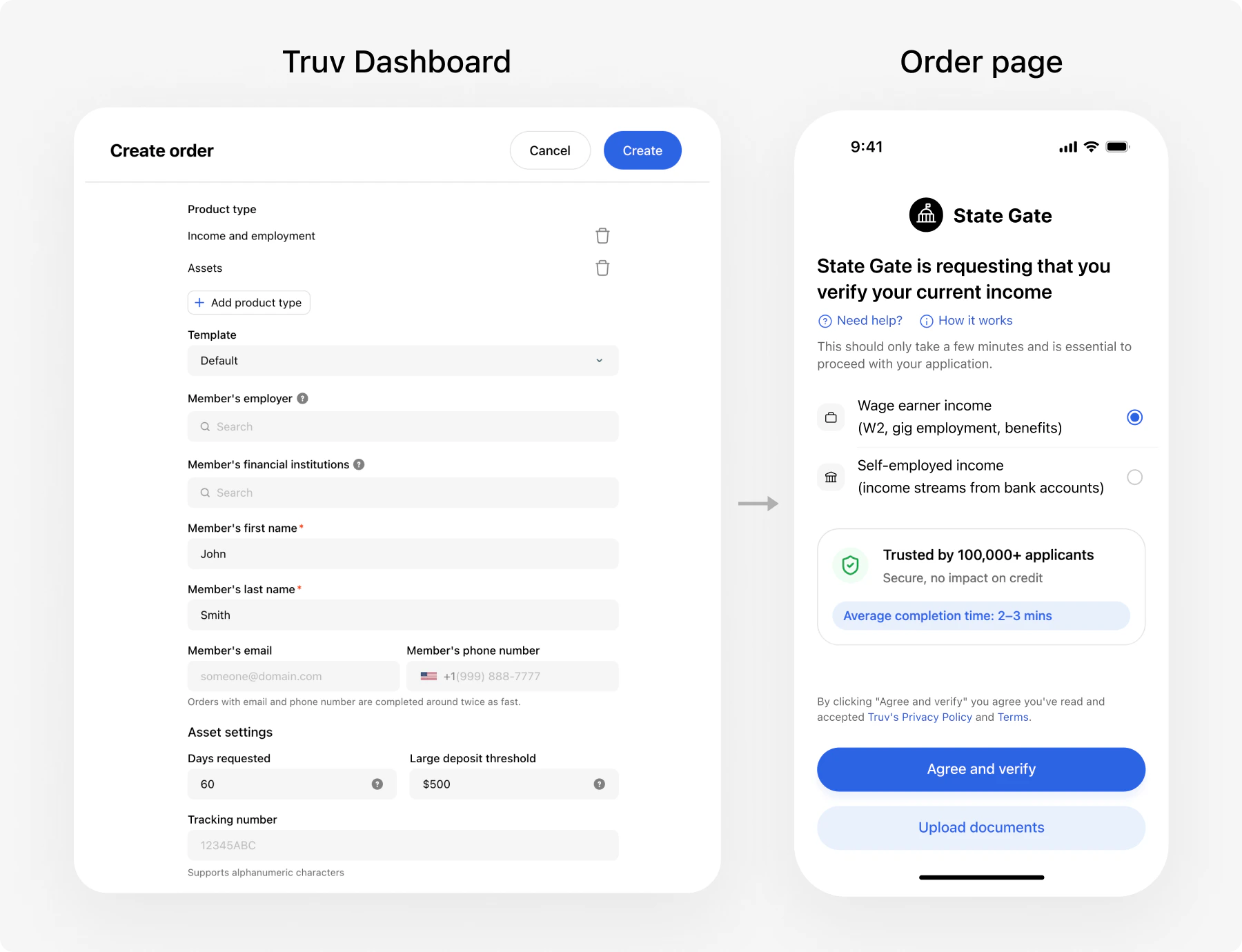 Use the Truv Dashboard to create and manage verification orders without any integration:
* Create orders manually via the Dashboard UI
* Send verification links to clients via email/SMS
* Caseworkers can view results directly in the Dashboard
* Configure [webhooks](/api-reference/webhooks) to automatically sync verified data to your eligibility system when verifications complete
[Learn more about Dashboard integration -->](/developers/dashboard)
### Option 2: Custom Integration (Recommended)
Use the Truv Dashboard to create and manage verification orders without any integration:
* Create orders manually via the Dashboard UI
* Send verification links to clients via email/SMS
* Caseworkers can view results directly in the Dashboard
* Configure [webhooks](/api-reference/webhooks) to automatically sync verified data to your eligibility system when verifications complete
[Learn more about Dashboard integration -->](/developers/dashboard)
### Option 2: Custom Integration (Recommended)
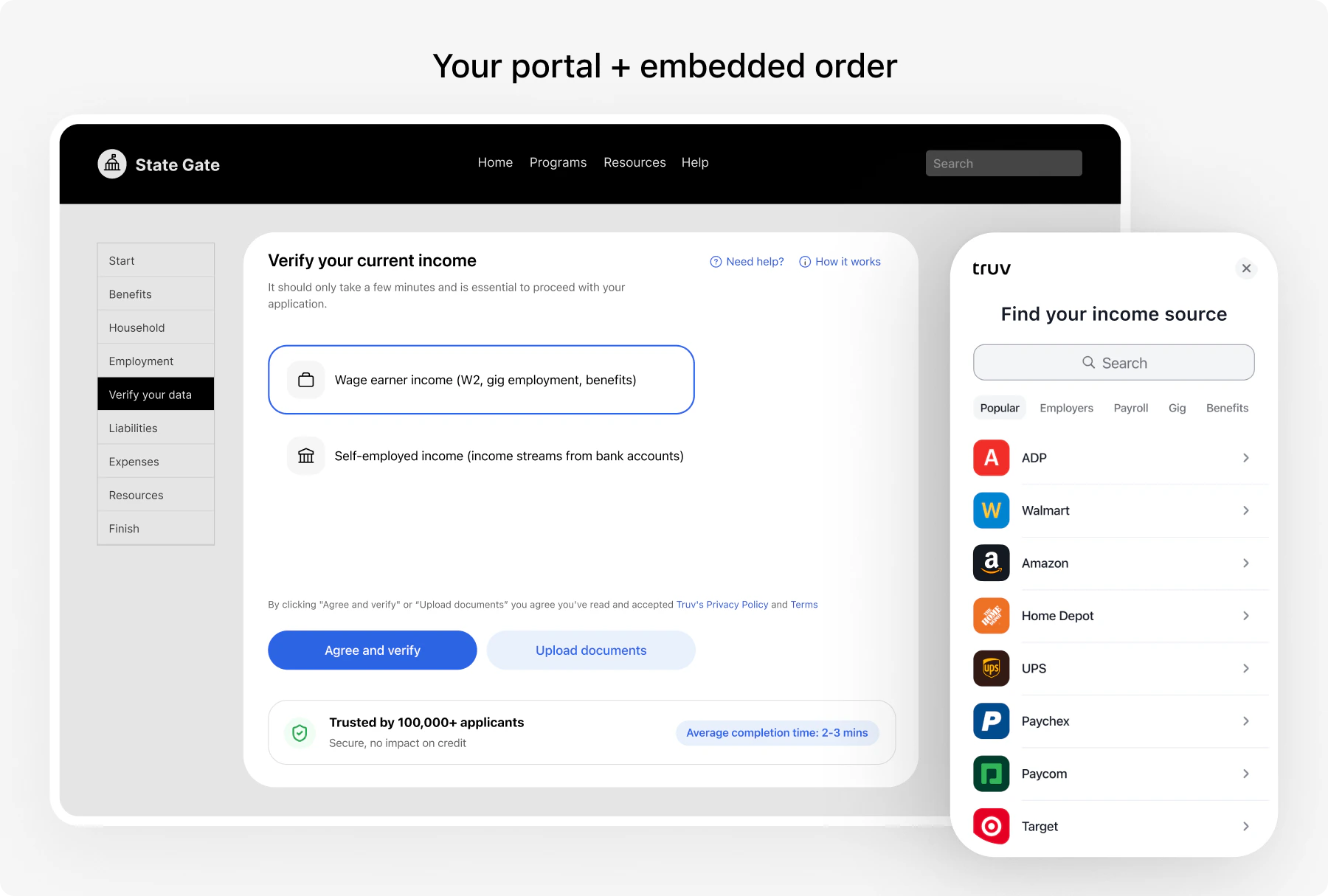 Embed Truv directly into your systems for a seamless client and caseworker experience. Choose the channels that fit your workflow.
Self-service verification embedded in your online benefits application
Send verification links and view pre-filled data in caseworker screens
Phone agents create orders and send links during the call
Clients scan a QR code at the office to verify on their own device
Automatic data refresh at recertification — no client action when sessions are active
Document upload is a fallback within any channel, not a separate integration. When a client cannot connect their payroll provider, Bridge automatically offers document upload. See [Document Processing](/government/products/document-processing) for details.
### Channel summary
| Channel | How it works | Client action |
| --------------------- | ------------------------------------------------------- | --------------------------------------------------- |
| **Customer Portal** | Embedded verification in the benefits application flow | Self-service during application |
| **Caseworker Portal** | Caseworker creates order, Truv sends link via email/SMS | Clicks link, completes verification on their device |
| **Contact Center** | Phone agent creates order during the call, sends link | Completes verification after the call |
| **In-Person Office** | Client scans QR code at the office | Verifies on their phone while at the office |
| **Renewals** | Automatic data refresh from existing connections | None if session is active; re-verifies if expired |
***
## Benefits for government agencies
* Reduce back-and-forth for pay stubs and employment documents
* Pre-fill eligibility workflows with verified data
* Speed up application review for straightforward cases
* Eliminate manual data entry and document collection
* Automatic data updates for recertification — no client outreach needed
* Staff can focus on complex cases instead of chasing documents
* Source-verified data eliminates transcription errors
* Real-time income data from payroll systems
* Consistent data format across all channels
* Reduce staff time spent on verification follow-up
* Lower manual processing overhead
* Reuse the same workflow for applications and renewals
* No need to gather pay stubs or mail documents
* Faster approval decisions
* Mobile-friendly — clients verify from any device
* Available in [multiple languages](#threshold-languages)
* Bank transaction data captures income outside traditional payroll
* Covers freelancers, gig workers, cash-paid clients
* Self-certification lets clients confirm income sources
***
## Compliance & Security
Review [Security](/api-reference/security) for current platform security details. If your agency has additional compliance, retention, or procurement requirements, confirm them directly with Truv before rollout.
[View security documentation -->](/api-reference/security)
***
## Threshold languages
Truv Bridge, emails, SMS messages, and landing pages support multiple languages. Pass the `locale` parameter when [creating an order](/api-reference/orders/orders_create) to set the language for the client's verification experience.
| Code | Language | Code | Language |
| ----- | -------- | ----- | ---------- |
| `en` | English | `ko` | Korean |
| `es` | Spanish | `lo` | Lao |
| `ar` | Arabic | `pa` | Punjabi |
| `cmn` | Mandarin | `pt` | Portuguese |
| `zh` | Chinese | `ru` | Russian |
| `fa` | Farsi | `so` | Somali |
| `hi` | Hindi | `tl` | Tagalog |
| `hmn` | Hmong | `th` | Thai |
| `hy` | Armenian | `uk` | Ukrainian |
| `ja` | Japanese | `vi` | Vietnamese |
| `km` | Khmer | `ium` | Mien |
Set the `locale` on the order to match the client's preferred language. Bridge, emails, and SMS all render in that language automatically.
***
## Template customization
Customize the verification experience — Bridge widget branding, email/SMS copy, and landing page appearance — using [templates](/developers/customization). Pass `template_id` when creating an order to apply a specific template.
Manage templates in the [Dashboard](https://dashboard.truv.com) under **Customization > Templates** or via the [Templates API](/api-reference/templates/object).
***
## Implementation timeline
| Phase | Dashboard (No Code) | Custom Integration |
| -------------- | ----------------------------------------------------------------------------------- | --------------------------------------------------------------------- |
| **Setup** | Configure templates, API keys, and order workflows in the Dashboard | Implement order creation, Bridge widget, webhooks, and data ingestion |
| **Testing** | Create test orders with [sandbox credentials](/developers/testing/test-credentials) | End-to-end testing with demo apps and sandbox |
| **Pilot** | Run a limited rollout with real clients | Deploy to staging, validate data flow into eligibility system |
| **Production** | Full rollout | Full rollout with monitoring |
***
## Get started
* Quick start with no code? --> [Dashboard Integration](/developers/dashboard)
* Building custom? --> Choose a channel above (Customer Portal, Caseworker Portal, Contact Center, or In-Person Office)
See a working verification flow locally. [Demo setup instructions](/developers/quickstarts-overview#demo-apps).
Use [sandbox credentials](/developers/testing/test-credentials) to test various income scenarios — W-2 employment, self-employment, multiple employers, SSA benefits.
Deploy to production and begin running live eligibility workflows.
***
## Resources
Choose your integration channels
Complete API documentation
Import the Postman collection for hands-on API testing
Sandbox credentials and test scenarios
Talk to our government solutions team
[support@truv.com](mailto:support@truv.com)
Embed Truv directly into your systems for a seamless client and caseworker experience. Choose the channels that fit your workflow.
Self-service verification embedded in your online benefits application
Send verification links and view pre-filled data in caseworker screens
Phone agents create orders and send links during the call
Clients scan a QR code at the office to verify on their own device
Automatic data refresh at recertification — no client action when sessions are active
Document upload is a fallback within any channel, not a separate integration. When a client cannot connect their payroll provider, Bridge automatically offers document upload. See [Document Processing](/government/products/document-processing) for details.
### Channel summary
| Channel | How it works | Client action |
| --------------------- | ------------------------------------------------------- | --------------------------------------------------- |
| **Customer Portal** | Embedded verification in the benefits application flow | Self-service during application |
| **Caseworker Portal** | Caseworker creates order, Truv sends link via email/SMS | Clicks link, completes verification on their device |
| **Contact Center** | Phone agent creates order during the call, sends link | Completes verification after the call |
| **In-Person Office** | Client scans QR code at the office | Verifies on their phone while at the office |
| **Renewals** | Automatic data refresh from existing connections | None if session is active; re-verifies if expired |
***
## Benefits for government agencies
* Reduce back-and-forth for pay stubs and employment documents
* Pre-fill eligibility workflows with verified data
* Speed up application review for straightforward cases
* Eliminate manual data entry and document collection
* Automatic data updates for recertification — no client outreach needed
* Staff can focus on complex cases instead of chasing documents
* Source-verified data eliminates transcription errors
* Real-time income data from payroll systems
* Consistent data format across all channels
* Reduce staff time spent on verification follow-up
* Lower manual processing overhead
* Reuse the same workflow for applications and renewals
* No need to gather pay stubs or mail documents
* Faster approval decisions
* Mobile-friendly — clients verify from any device
* Available in [multiple languages](#threshold-languages)
* Bank transaction data captures income outside traditional payroll
* Covers freelancers, gig workers, cash-paid clients
* Self-certification lets clients confirm income sources
***
## Compliance & Security
Review [Security](/api-reference/security) for current platform security details. If your agency has additional compliance, retention, or procurement requirements, confirm them directly with Truv before rollout.
[View security documentation -->](/api-reference/security)
***
## Threshold languages
Truv Bridge, emails, SMS messages, and landing pages support multiple languages. Pass the `locale` parameter when [creating an order](/api-reference/orders/orders_create) to set the language for the client's verification experience.
| Code | Language | Code | Language |
| ----- | -------- | ----- | ---------- |
| `en` | English | `ko` | Korean |
| `es` | Spanish | `lo` | Lao |
| `ar` | Arabic | `pa` | Punjabi |
| `cmn` | Mandarin | `pt` | Portuguese |
| `zh` | Chinese | `ru` | Russian |
| `fa` | Farsi | `so` | Somali |
| `hi` | Hindi | `tl` | Tagalog |
| `hmn` | Hmong | `th` | Thai |
| `hy` | Armenian | `uk` | Ukrainian |
| `ja` | Japanese | `vi` | Vietnamese |
| `km` | Khmer | `ium` | Mien |
Set the `locale` on the order to match the client's preferred language. Bridge, emails, and SMS all render in that language automatically.
***
## Template customization
Customize the verification experience — Bridge widget branding, email/SMS copy, and landing page appearance — using [templates](/developers/customization). Pass `template_id` when creating an order to apply a specific template.
Manage templates in the [Dashboard](https://dashboard.truv.com) under **Customization > Templates** or via the [Templates API](/api-reference/templates/object).
***
## Implementation timeline
| Phase | Dashboard (No Code) | Custom Integration |
| -------------- | ----------------------------------------------------------------------------------- | --------------------------------------------------------------------- |
| **Setup** | Configure templates, API keys, and order workflows in the Dashboard | Implement order creation, Bridge widget, webhooks, and data ingestion |
| **Testing** | Create test orders with [sandbox credentials](/developers/testing/test-credentials) | End-to-end testing with demo apps and sandbox |
| **Pilot** | Run a limited rollout with real clients | Deploy to staging, validate data flow into eligibility system |
| **Production** | Full rollout | Full rollout with monitoring |
***
## Get started
* Quick start with no code? --> [Dashboard Integration](/developers/dashboard)
* Building custom? --> Choose a channel above (Customer Portal, Caseworker Portal, Contact Center, or In-Person Office)
See a working verification flow locally. [Demo setup instructions](/developers/quickstarts-overview#demo-apps).
Use [sandbox credentials](/developers/testing/test-credentials) to test various income scenarios — W-2 employment, self-employment, multiple employers, SSA benefits.
Deploy to production and begin running live eligibility workflows.
***
## Resources
Choose your integration channels
Complete API documentation
Import the Postman collection for hands-on API testing
Sandbox credentials and test scenarios
Talk to our government solutions team
[support@truv.com](mailto:support@truv.com)