> ## Documentation Index
> Fetch the complete documentation index at: https://docs.truv.com/llms.txt
> Use this file to discover all available pages before exploring further.
# Case Worker Portal Demo
> Create verification orders from applicant data and send a link for self-service completion
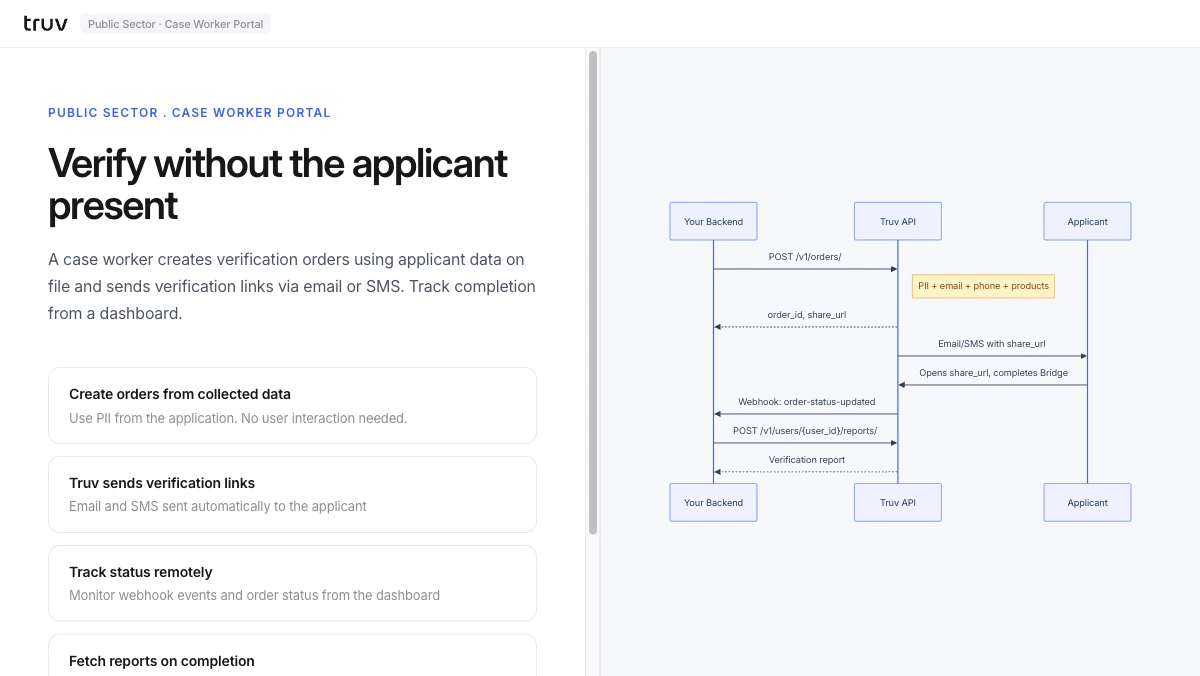
The Case Worker Portal demo shows server-side order creation for government workflows: a caseworker creates verification orders using applicant data on file, and Truv sends the applicant a link to complete verification on their own device. **Source:** [GitHub](https://github.com/truvhq/demo-apps#public-sector)
```bash theme={null}
git clone https://github.com/truvhq/demo-apps.git
cd demo-apps && npm install && cp .env.example .env
npm start && npm run dev # select "Public Sector" → "Case Worker Portal"
```
 ## Flow
Enter applicant PII from the case management system. The backend creates an order and receives a `share_url`.
```
POST /v1/orders/
# Returns order_id + share_url
```
Truv delivers the `share_url` to the applicant via email or SMS.
The applicant opens the link and connects their employer. `order-status-updated` fires on completion.
```
POST /v1/users/{user_id}/reports/
```
**Integration pattern:** [Hosted Orders](/developers/integration/hosted-orders/new-user) | **Products:** VOIE, VOE
## Flow
Enter applicant PII from the case management system. The backend creates an order and receives a `share_url`.
```
POST /v1/orders/
# Returns order_id + share_url
```
Truv delivers the `share_url` to the applicant via email or SMS.
The applicant opens the link and connects their employer. `order-status-updated` fires on completion.
```
POST /v1/users/{user_id}/reports/
```
**Integration pattern:** [Hosted Orders](/developers/integration/hosted-orders/new-user) | **Products:** VOIE, VOE