> ## Documentation Index
> Fetch the complete documentation index at: https://docs.truv.com/llms.txt
> Use this file to discover all available pages before exploring further.
# POS Tasks Demo
> Complete outstanding income, employment, and asset verifications after loan submission
The POS Tasks demo shows the follow-up flow: after submitting a loan application, the borrower returns to complete outstanding verification tasks — income, employment, and assets — all linked by a shared `external_user_id`. **Source:** [GitHub](https://github.com/truvhq/demo-apps#mortgage)
```bash theme={null}
git clone https://github.com/truvhq/demo-apps.git
cd demo-apps && npm install && cp .env.example .env
npm start && npm run dev # select "Mortgage" → "POS Tasks"
```
 ## Flow
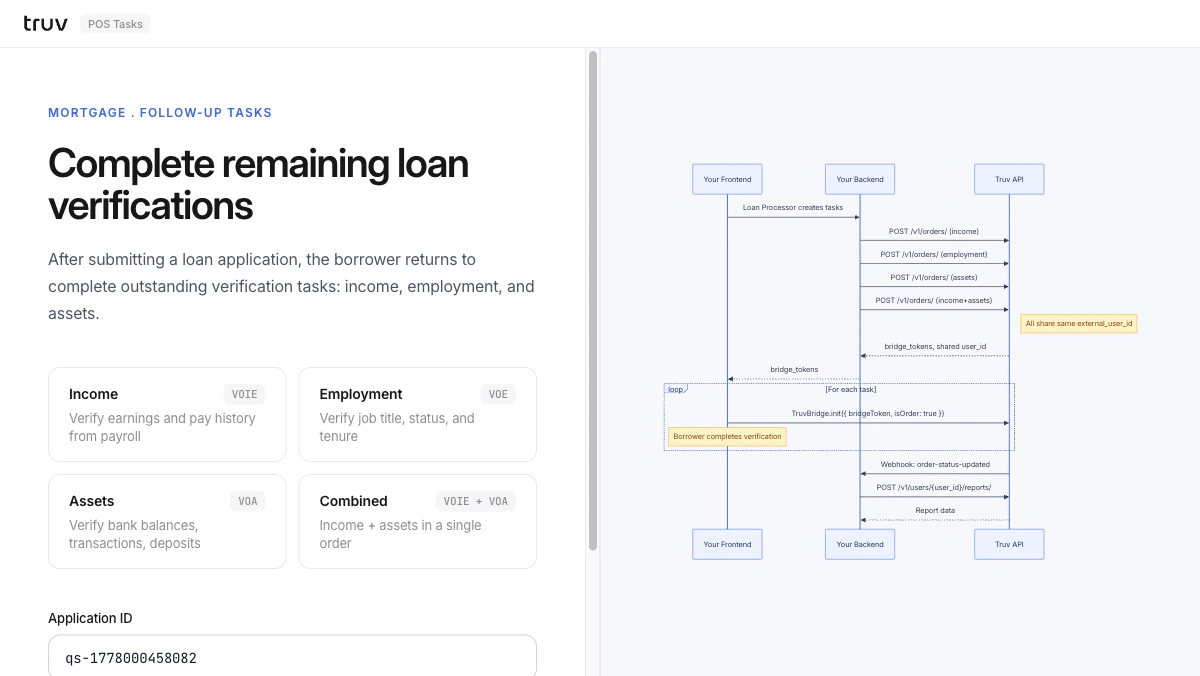
The loan processor creates separate orders for income, employment, and assets — all sharing the same `external_user_id`.
```
POST /v1/orders/ # income
POST /v1/orders/ # employment
POST /v1/orders/ # assets
```
Each order returns a `bridge_token`. Bridge opens for each task in sequence.
Sandbox credentials: `goodlogin` / `goodpassword`
`order-status-updated` fires per task. Fetch the appropriate report for each.
```
POST /v1/users/{user_id}/reports/
POST /v1/users/{user_id}/assets/reports/
```
**Integration pattern:** [Embedded Orders](/developers/integration/embedded-orders/overview) (multi-task) | **Products:** VOIE, VOE, VOA
## Flow
The loan processor creates separate orders for income, employment, and assets — all sharing the same `external_user_id`.
```
POST /v1/orders/ # income
POST /v1/orders/ # employment
POST /v1/orders/ # assets
```
Each order returns a `bridge_token`. Bridge opens for each task in sequence.
Sandbox credentials: `goodlogin` / `goodpassword`
`order-status-updated` fires per task. Fetch the appropriate report for each.
```
POST /v1/users/{user_id}/reports/
POST /v1/users/{user_id}/assets/reports/
```
**Integration pattern:** [Embedded Orders](/developers/integration/embedded-orders/overview) (multi-task) | **Products:** VOIE, VOE, VOA