> ## Documentation Index
> Fetch the complete documentation index at: https://docs.truv.com/llms.txt
> Use this file to discover all available pages before exploring further.
# Document Processing Demo
> Upload pay stubs, W-2s, and tax returns and extract structured income data for underwriting
The Document Processing demo shows how to validate and extract structured income data from documents already collected — pay stubs, W-2 forms, tax returns, and bank statements — without launching Bridge. **Source:** [GitHub](https://github.com/truvhq/demo-apps#mortgage)
```bash theme={null}
git clone https://github.com/truvhq/demo-apps.git
cd demo-apps && npm install && cp .env.example .env
npm start && npm run dev # select "Mortgage" → "Document Processing"
```
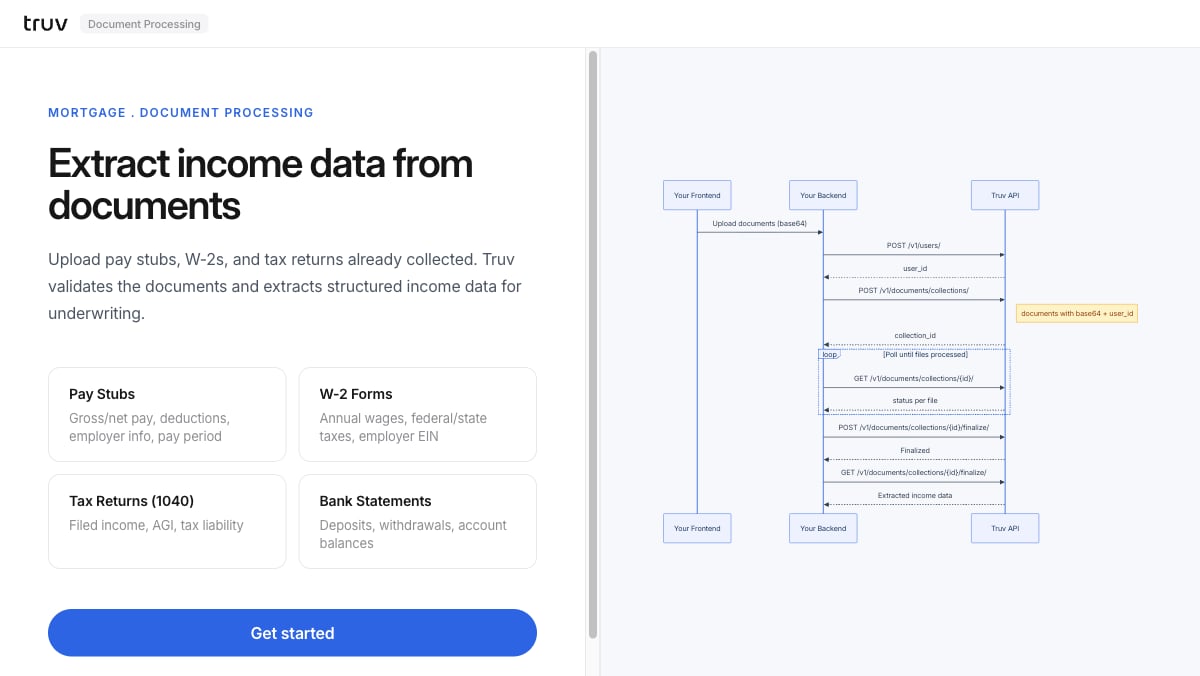 ## Flow
Upload pay stubs, W-2s, 1040s, or bank statements. The backend creates a user and a document collection.
```
POST /v1/users/
POST /v1/documents/collections/
```
Poll until all files reach a terminal status.
```
GET /v1/documents/collections/{id}/
```
Finalize the collection to generate the structured income report.
```
POST /v1/documents/collections/{id}/finalize/
GET /v1/documents/collections/{id}/finalize/
```
**Integration pattern:** [Document Processing](/developers/integration/document-processing) | **Products:** Pay stubs, W-2s, 1040s, bank statements
## Flow
Upload pay stubs, W-2s, 1040s, or bank statements. The backend creates a user and a document collection.
```
POST /v1/users/
POST /v1/documents/collections/
```
Poll until all files reach a terminal status.
```
GET /v1/documents/collections/{id}/
```
Finalize the collection to generate the structured income report.
```
POST /v1/documents/collections/{id}/finalize/
GET /v1/documents/collections/{id}/finalize/
```
**Integration pattern:** [Document Processing](/developers/integration/document-processing) | **Products:** Pay stubs, W-2s, 1040s, bank statements