> ## Documentation Index
> Fetch the complete documentation index at: https://docs.truv.com/llms.txt
> Use this file to discover all available pages before exploring further.
# Payroll Income Demo
> Verify income and employment directly from payroll data for fast lending decisions
The Payroll Income demo shows the fastest path to income verification: connect directly to the applicant's payroll provider to return current income, employment status, and pay history in a single flow. **Source:** [GitHub](https://github.com/truvhq/demo-apps#consumer-credit)
```bash theme={null}
git clone https://github.com/truvhq/demo-apps.git
cd demo-apps && npm install && cp .env.example .env
npm start && npm run dev # select "Consumer Credit" → "Payroll Income"
```
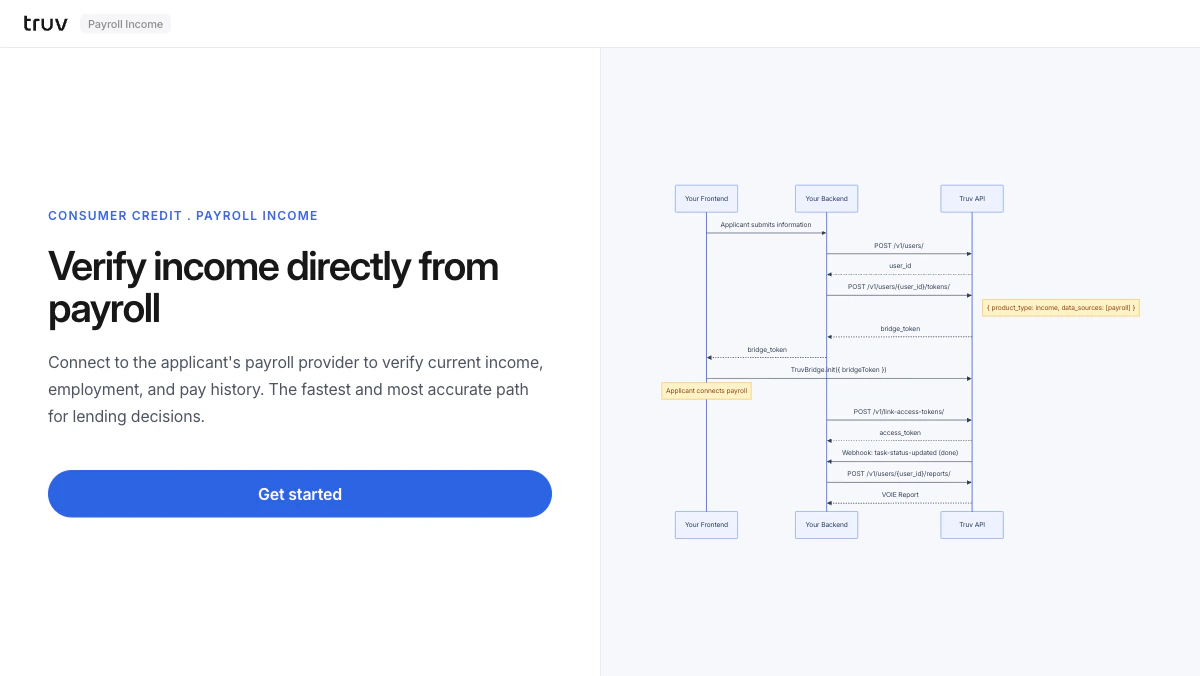 ## Flow
The backend creates a user and generates a bridge token restricted to payroll providers.
```
POST /v1/users/
POST /v1/users/{id}/tokens/
# { product_type: "income", data_sources: ["payroll"] }
```
Bridge opens showing only payroll providers. The applicant selects their employer and logs in.
Sandbox credentials: `goodlogin` / `goodpassword`
`task-status-updated` fires on completion. Fetch the VOIE report.
```
POST /v1/users/{user_id}/reports/
```
**Integration pattern:** [Bridge Widget](/developers/integration/bridge-widget/overview) | **Products:** VOIE
## Flow
The backend creates a user and generates a bridge token restricted to payroll providers.
```
POST /v1/users/
POST /v1/users/{id}/tokens/
# { product_type: "income", data_sources: ["payroll"] }
```
Bridge opens showing only payroll providers. The applicant selects their employer and logs in.
Sandbox credentials: `goodlogin` / `goodpassword`
`task-status-updated` fires on completion. Fetch the VOIE report.
```
POST /v1/users/{user_id}/reports/
```
**Integration pattern:** [Bridge Widget](/developers/integration/bridge-widget/overview) | **Products:** VOIE