> ## Documentation Index
> Fetch the complete documentation index at: https://docs.truv.com/llms.txt
> Use this file to discover all available pages before exploring further.
# Paycheck-Linked Loans Demo
> Verify income and set up automatic loan repayment through payroll deductions in one flow
The Paycheck-Linked Loans demo shows how to verify income and configure automatic loan repayment via payroll deductions in one Bridge flow. Payments start on the next pay cycle once the applicant connects their payroll provider. **Source:** [GitHub](https://github.com/truvhq/demo-apps#consumer-credit)
```bash theme={null}
git clone https://github.com/truvhq/demo-apps.git
cd demo-apps && npm install && cp .env.example .env
npm start && npm run dev # select "Consumer Credit" → "Paycheck-Linked Loans"
```
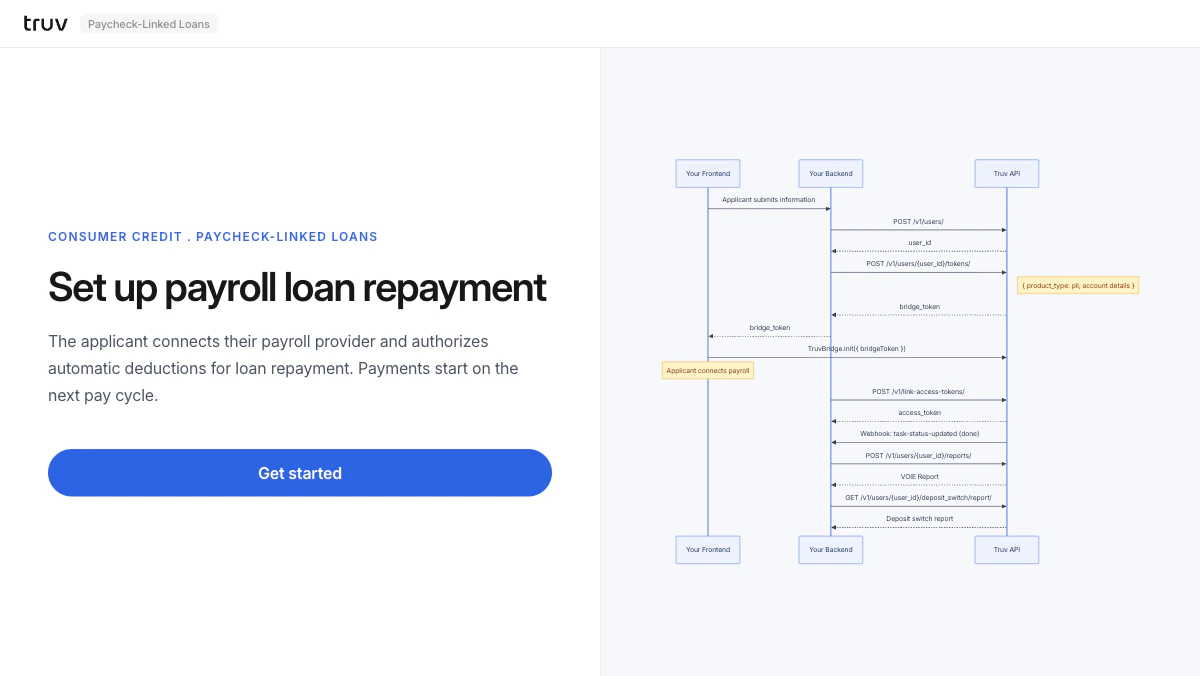 ## Flow
The backend creates a user and generates a bridge token with `product_type: pll`.
```
POST /v1/users/
POST /v1/users/{id}/tokens/
# { product_type: "pll", account_details: true }
```
Bridge opens. The applicant selects their employer, logs in, and authorizes the payroll deduction.
Sandbox credentials: `goodlogin` / `goodpassword`
`task-status-updated` fires on completion. Fetch both the VOIE report and the deposit switch report.
```
POST /v1/users/{user_id}/reports/
GET /v1/users/{user_id}/deposit_switch/report/
```
**Integration pattern:** [Bridge Widget](/developers/integration/bridge-widget/overview) | **Products:** PLL
## Flow
The backend creates a user and generates a bridge token with `product_type: pll`.
```
POST /v1/users/
POST /v1/users/{id}/tokens/
# { product_type: "pll", account_details: true }
```
Bridge opens. The applicant selects their employer, logs in, and authorizes the payroll deduction.
Sandbox credentials: `goodlogin` / `goodpassword`
`task-status-updated` fires on completion. Fetch both the VOIE report and the deposit switch report.
```
POST /v1/users/{user_id}/reports/
GET /v1/users/{user_id}/deposit_switch/report/
```
**Integration pattern:** [Bridge Widget](/developers/integration/bridge-widget/overview) | **Products:** PLL