> ## Documentation Index
> Fetch the complete documentation index at: https://docs.truv.com/llms.txt
> Use this file to discover all available pages before exploring further.
# Bank Income Demo
> Verify applicant income from bank transactions when payroll data is unavailable
The Bank Income demo shows how to verify income by connecting to an applicant's bank account and analyzing transaction history — use this when payroll data isn't available for the applicant's employer. **Source:** [GitHub](https://github.com/truvhq/demo-apps#consumer-credit)
```bash theme={null}
git clone https://github.com/truvhq/demo-apps.git
cd demo-apps && npm install && cp .env.example .env
npm start && npm run dev # select "Consumer Credit" → "Bank Income"
```
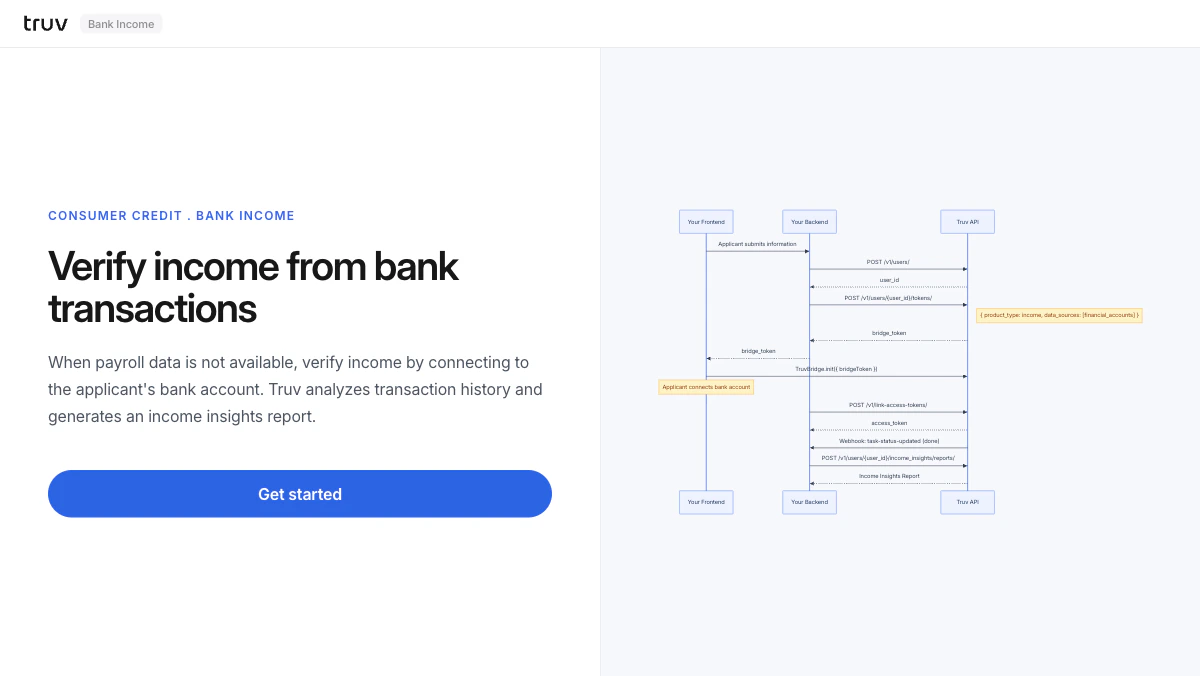 ## Flow
The backend creates a user and generates a bridge token restricted to financial accounts.
```
POST /v1/users/
POST /v1/users/{id}/tokens/
# { product_type: "income", data_sources: ["financial_accounts"] }
```
Bridge opens showing only financial institutions. The applicant selects their bank and logs in.
Sandbox credentials: `goodlogin` / `goodpassword`
`task-status-updated` fires on completion. Fetch the Income Insights report.
```
POST /v1/users/{user_id}/income_insights/reports/
```
**Integration pattern:** [Bridge Widget](/developers/integration/bridge-widget/overview) | **Products:** Income Insights
## Flow
The backend creates a user and generates a bridge token restricted to financial accounts.
```
POST /v1/users/
POST /v1/users/{id}/tokens/
# { product_type: "income", data_sources: ["financial_accounts"] }
```
Bridge opens showing only financial institutions. The applicant selects their bank and logs in.
Sandbox credentials: `goodlogin` / `goodpassword`
`task-status-updated` fires on completion. Fetch the Income Insights report.
```
POST /v1/users/{user_id}/income_insights/reports/
```
**Integration pattern:** [Bridge Widget](/developers/integration/bridge-widget/overview) | **Products:** Income Insights