> ## Documentation Index
> Fetch the complete documentation index at: https://docs.truv.com/llms.txt
> Use this file to discover all available pages before exploring further.
# Emulator
> Preview and test the Truv verification experience as the end-user using different products and flows.
Walk through the end-user verification experience with simulated conditions — preview templates, test workflows, and demo the Bridge flow before shipping.
***
## Configure the emulator
Emulator allows you to explore the end-user experience using different Products, Solutions, Templates, as well as routing to a specific Company or Payroll provider.
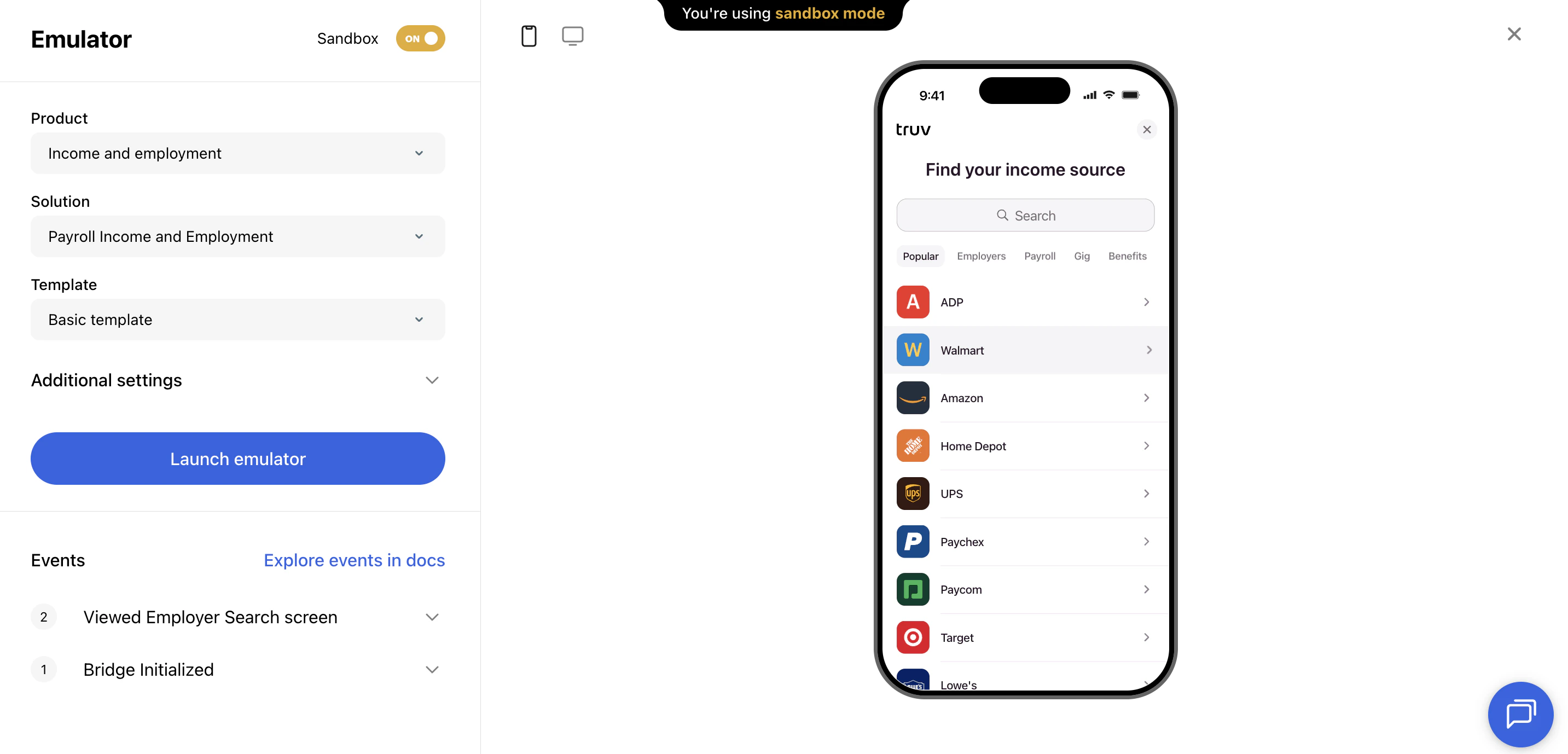 | Option | Description |
| ------------------------- | ------------------------------------------------------------------------------------------------------- |
| **Product type** | Income & Employment, Assets, etc. |
| **Solution** | Payroll only, or include fallback workflows (document upload, financial accounts, etc.) |
| **Template** | Preview how your branding and [template configuration](/developers/dashboard/customization) will appear |
| **Company / Provider ID** | Optionally specify a company or provider to open that connection directly |
***
## Explore the verification flow
Once configured, click any company in the search results and use one of our [login test credentials](/developers/testing/test-credentials#universal-login-scenarios) to begin the simulated login experience.
In Sandbox mode, the emulator lets you test every solution:
* Payroll connections
* Financial accounts
* Document processing (paystubs, W-2s, tax returns)
* Smart routing, Choice Connect, and fallback workflow behavior
As you click through the experience, login events and their corresponding JSON payloads are loaded in real time.
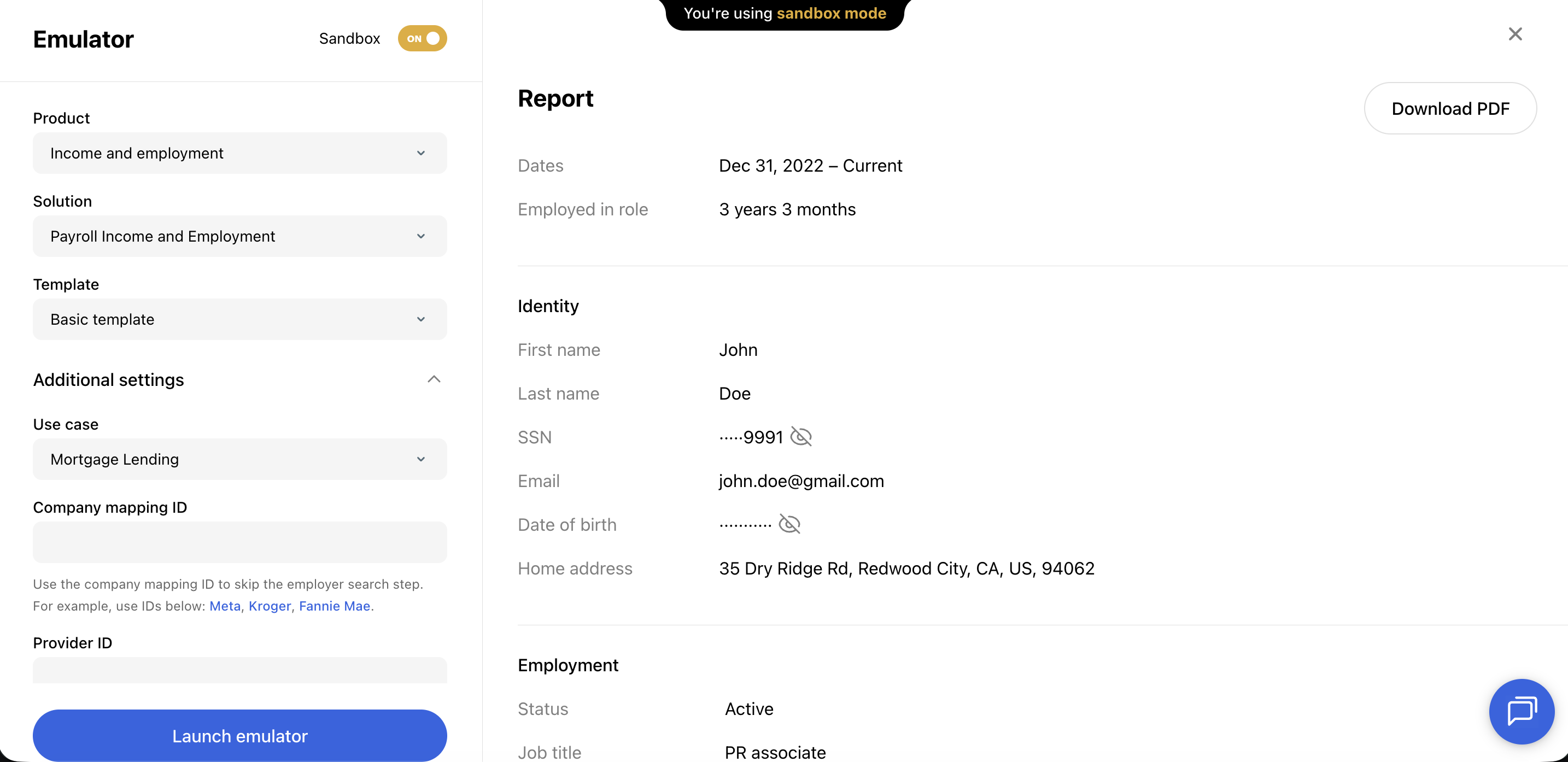
Once a connection is complete, the returned report can be viewed in the UI, as a JSON payload, or downloaded via PDF.
| Option | Description |
| ------------------------- | ------------------------------------------------------------------------------------------------------- |
| **Product type** | Income & Employment, Assets, etc. |
| **Solution** | Payroll only, or include fallback workflows (document upload, financial accounts, etc.) |
| **Template** | Preview how your branding and [template configuration](/developers/dashboard/customization) will appear |
| **Company / Provider ID** | Optionally specify a company or provider to open that connection directly |
***
## Explore the verification flow
Once configured, click any company in the search results and use one of our [login test credentials](/developers/testing/test-credentials#universal-login-scenarios) to begin the simulated login experience.
In Sandbox mode, the emulator lets you test every solution:
* Payroll connections
* Financial accounts
* Document processing (paystubs, W-2s, tax returns)
* Smart routing, Choice Connect, and fallback workflow behavior
As you click through the experience, login events and their corresponding JSON payloads are loaded in real time.
Once a connection is complete, the returned report can be viewed in the UI, as a JSON payload, or downloaded via PDF.
 ***
## Common use cases
* **Training demos** — Walk a client through the borrower experience before go-live, with their branding applied via a template
* **Template QA** — Validate that branding, copy, and search categories are configured correctly
* **Workflow testing** — Reproduce specific fallback or error scenarios in a controlled environment
***
## Next steps
Use sandbox credentials to simulate different outcomes
Configure the template shown in the emulator
***
## Common use cases
* **Training demos** — Walk a client through the borrower experience before go-live, with their branding applied via a template
* **Template QA** — Validate that branding, copy, and search categories are configured correctly
* **Workflow testing** — Reproduce specific fallback or error scenarios in a controlled environment
***
## Next steps
Use sandbox credentials to simulate different outcomes
Configure the template shown in the emulator