> ## Documentation Index
> Fetch the complete documentation index at: https://docs.truv.com/llms.txt
> Use this file to discover all available pages before exploring further.
# Development
> Manage API keys, view logs, and configure webhooks for your Truv integration
Authenticate, debug, and extend your Truv integration from one place — manage API keys, inspect request logs, and configure webhooks. The Development section has three tabs: **API Keys**, **Logs**, and **Webhooks**.
***
## API Keys
The API Keys tab is where you find and manage your Truv credentials.
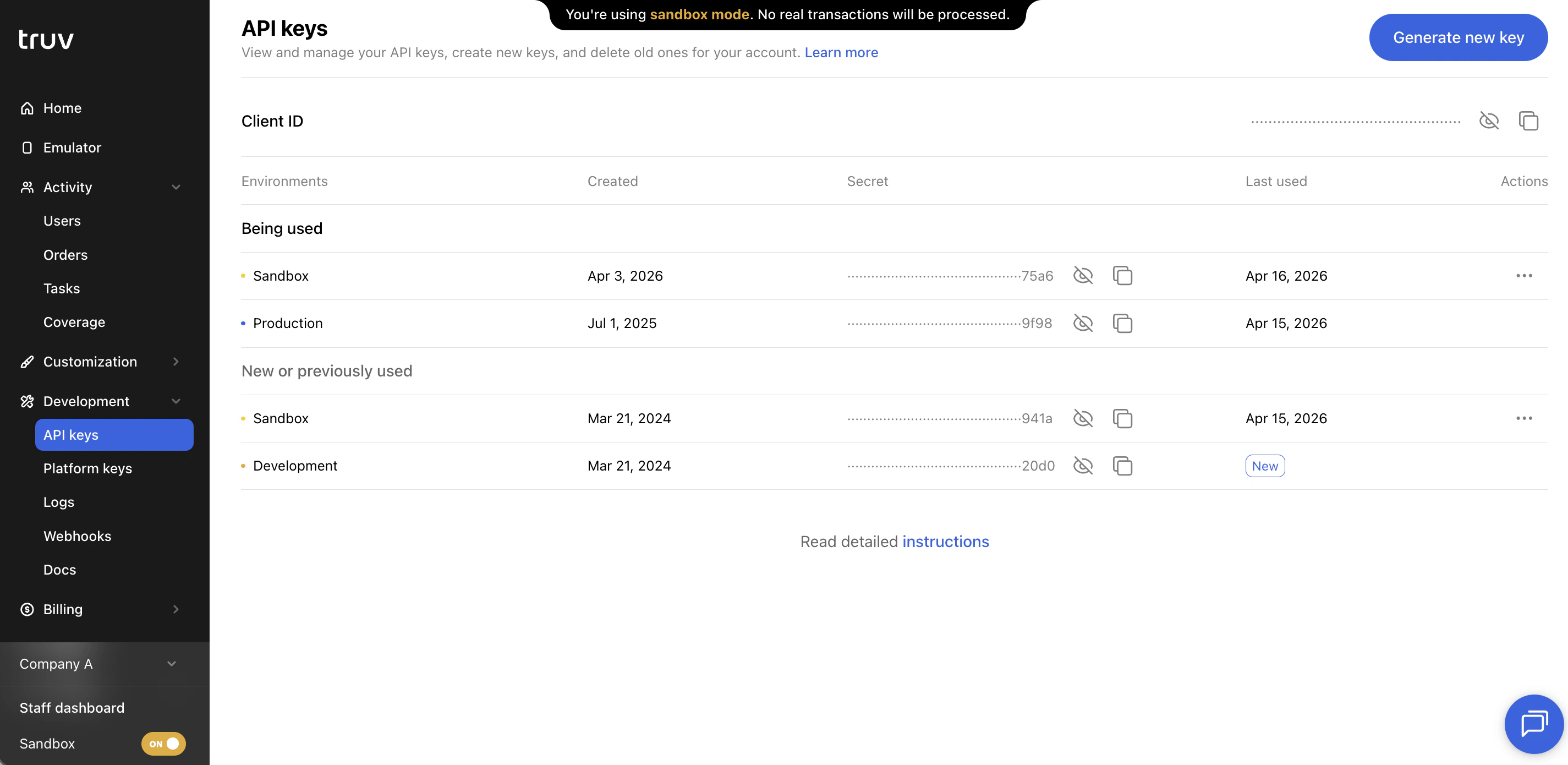 ### Client ID
Your **Client ID** is displayed at the top of the page. Pass it as the `X-Access-Client-Id` header on all API requests.
### Keys table
The table shows all API keys for your account, grouped by environment (Sandbox, Development, Production):
| Column | Description |
| ---------------- | ------------------------------------------------ |
| **Environment** | Sandbox, Development, or Production |
| **Created date** | When the key was generated |
| **Secret** | Masked except for the last four characters |
| **Last used** | Most recent API call authenticated with this key |
#### Actions
* **Reveal** — Show the full key value on screen
* **Copy** — Copy to clipboard without revealing
* **Delete** — Permanently remove the key (irreversible)
* **Generate new key** — Create a new key for an environment
You cannot have more than **two active keys per environment**. Deleting a key is permanent and immediately revokes authentication for any system using it.
### Rotate API keys
To rotate keys without downtime:
1. Generate a new key
2. Update your integration to use the new key
3. Test to confirm the new key works
4. Delete the old key only after confirming the new key is live
See [API Keys Rotation](/api-reference/authentication) for the full rotation guide.
***
## Logs
The Logs tab shows a record of all API requests associated with your account.
### Client ID
Your **Client ID** is displayed at the top of the page. Pass it as the `X-Access-Client-Id` header on all API requests.
### Keys table
The table shows all API keys for your account, grouped by environment (Sandbox, Development, Production):
| Column | Description |
| ---------------- | ------------------------------------------------ |
| **Environment** | Sandbox, Development, or Production |
| **Created date** | When the key was generated |
| **Secret** | Masked except for the last four characters |
| **Last used** | Most recent API call authenticated with this key |
#### Actions
* **Reveal** — Show the full key value on screen
* **Copy** — Copy to clipboard without revealing
* **Delete** — Permanently remove the key (irreversible)
* **Generate new key** — Create a new key for an environment
You cannot have more than **two active keys per environment**. Deleting a key is permanent and immediately revokes authentication for any system using it.
### Rotate API keys
To rotate keys without downtime:
1. Generate a new key
2. Update your integration to use the new key
3. Test to confirm the new key works
4. Delete the old key only after confirming the new key is live
See [API Keys Rotation](/api-reference/authentication) for the full rotation guide.
***
## Logs
The Logs tab shows a record of all API requests associated with your account.
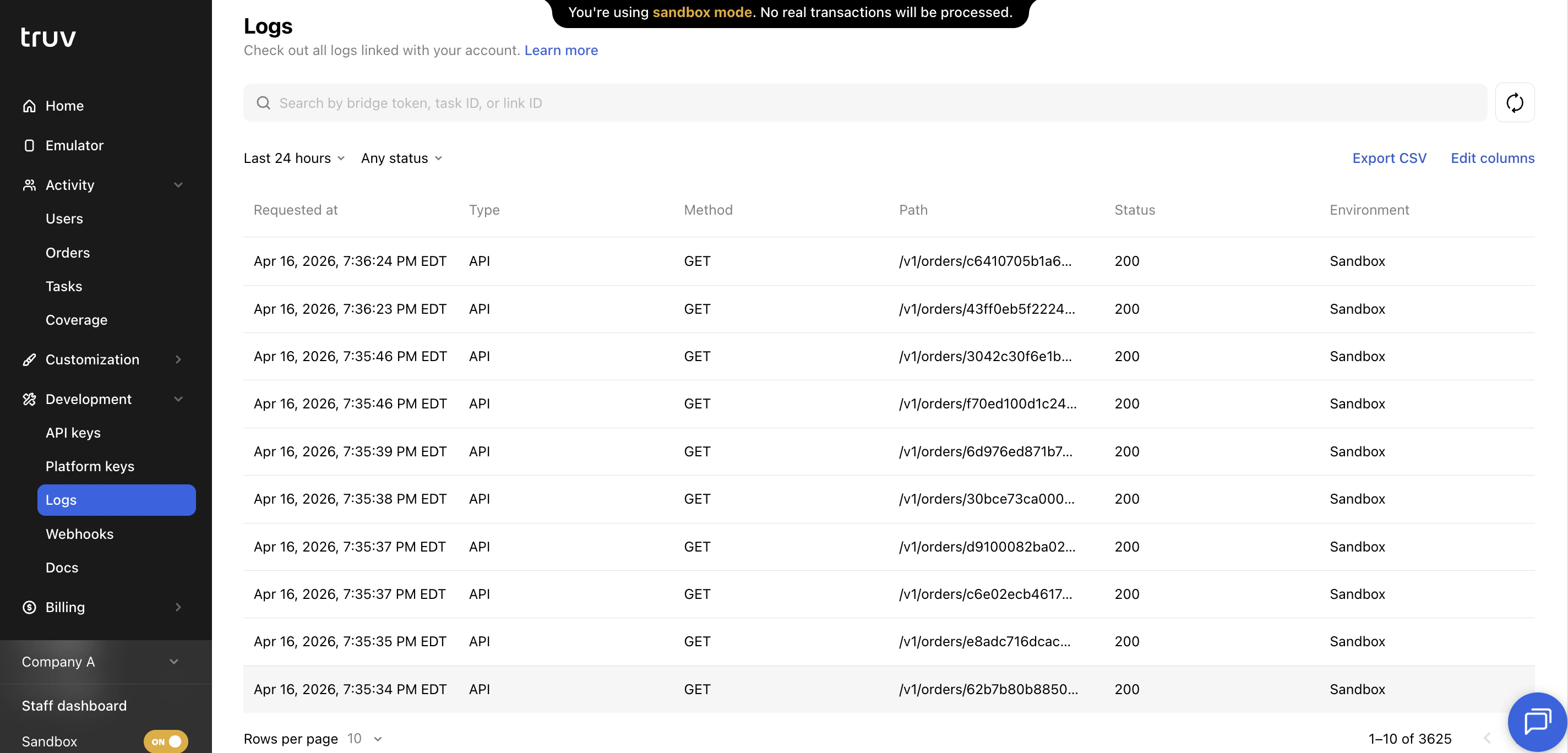 ### Filters
| Filter | Description |
| -------------- | ----------------------------------------- |
| **Date range** | Narrow to a specific time window |
| **Status** | HTTP response status: 200, 400, 500, etc. |
| **Brand** | Filter by a specific sub-company or brand |
Use Logs to debug integration issues, trace specific requests, and understand API traffic patterns.
***
## Webhooks
The Webhooks tab lets you configure endpoints where Truv sends event notifications.
### Filters
| Filter | Description |
| -------------- | ----------------------------------------- |
| **Date range** | Narrow to a specific time window |
| **Status** | HTTP response status: 200, 400, 500, etc. |
| **Brand** | Filter by a specific sub-company or brand |
Use Logs to debug integration issues, trace specific requests, and understand API traffic patterns.
***
## Webhooks
The Webhooks tab lets you configure endpoints where Truv sends event notifications.
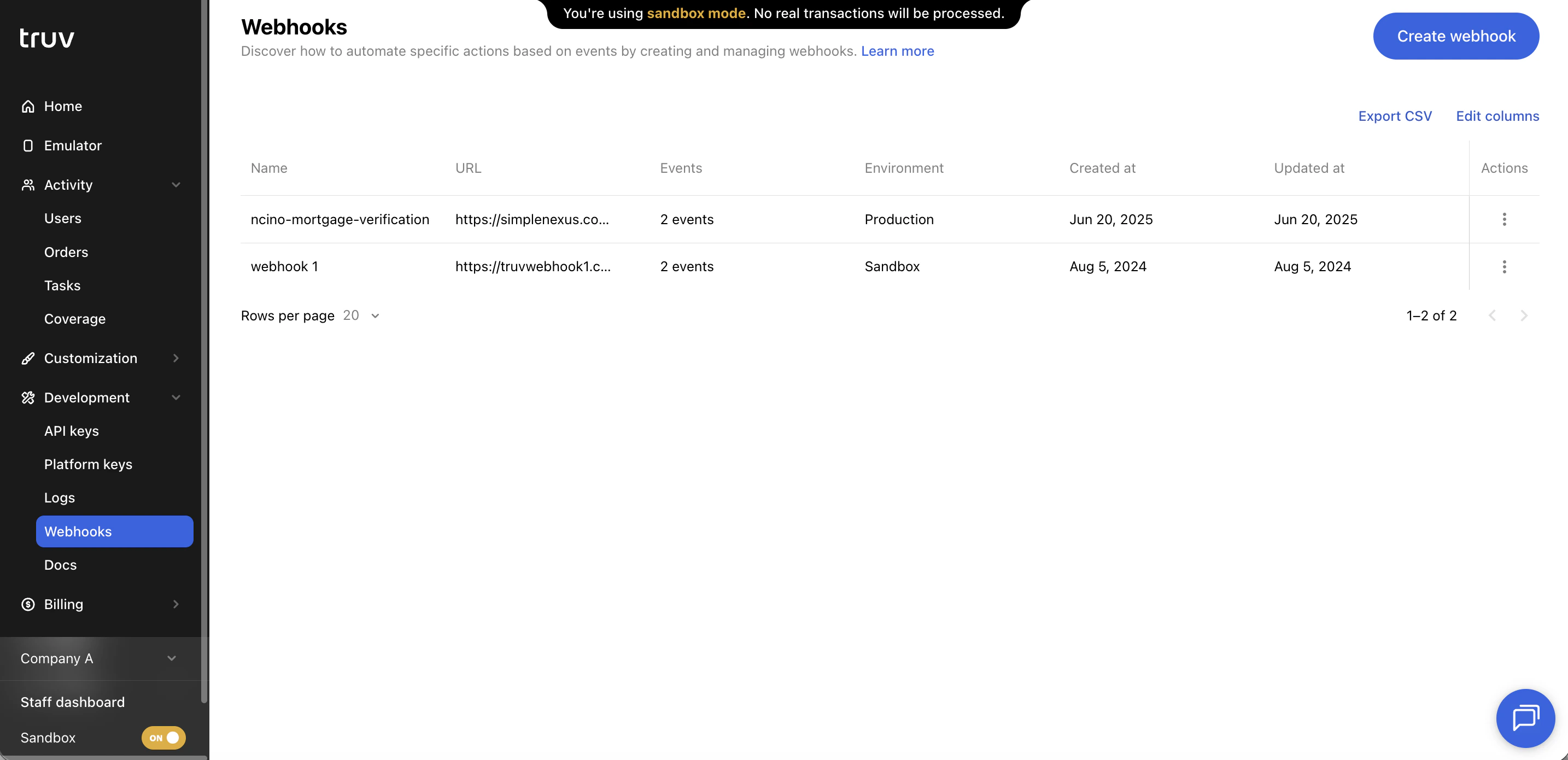 ### Create a webhook
| Field | Description |
| --------------- | ------------------------------------------------- |
| **Name** | A label to identify this webhook |
| **URL** | The HTTPS endpoint where Truv sends POST requests |
| **Environment** | Production, Development, or Sandbox |
| **Events** | The event types that trigger this webhook |
Always validate the `X-WEBHOOK-SIGN` header before processing any webhook payload. See [Webhook Security](/api-reference/security#webhook-signature-verification).
See [Webhooks](/api-reference/webhooks) for the full list of supported event types and payload schemas, plus delivery best practices — 10-second timeout, retry behavior, and idempotency guidance.
***
## Next steps
API authentication reference
Full list of webhook event types
Step-by-step key rotation guide
Webhook signature verification
### Create a webhook
| Field | Description |
| --------------- | ------------------------------------------------- |
| **Name** | A label to identify this webhook |
| **URL** | The HTTPS endpoint where Truv sends POST requests |
| **Environment** | Production, Development, or Sandbox |
| **Events** | The event types that trigger this webhook |
Always validate the `X-WEBHOOK-SIGN` header before processing any webhook payload. See [Webhook Security](/api-reference/security#webhook-signature-verification).
See [Webhooks](/api-reference/webhooks) for the full list of supported event types and payload schemas, plus delivery best practices — 10-second timeout, retry behavior, and idempotency guidance.
***
## Next steps
API authentication reference
Full list of webhook event types
Step-by-step key rotation guide
Webhook signature verification