


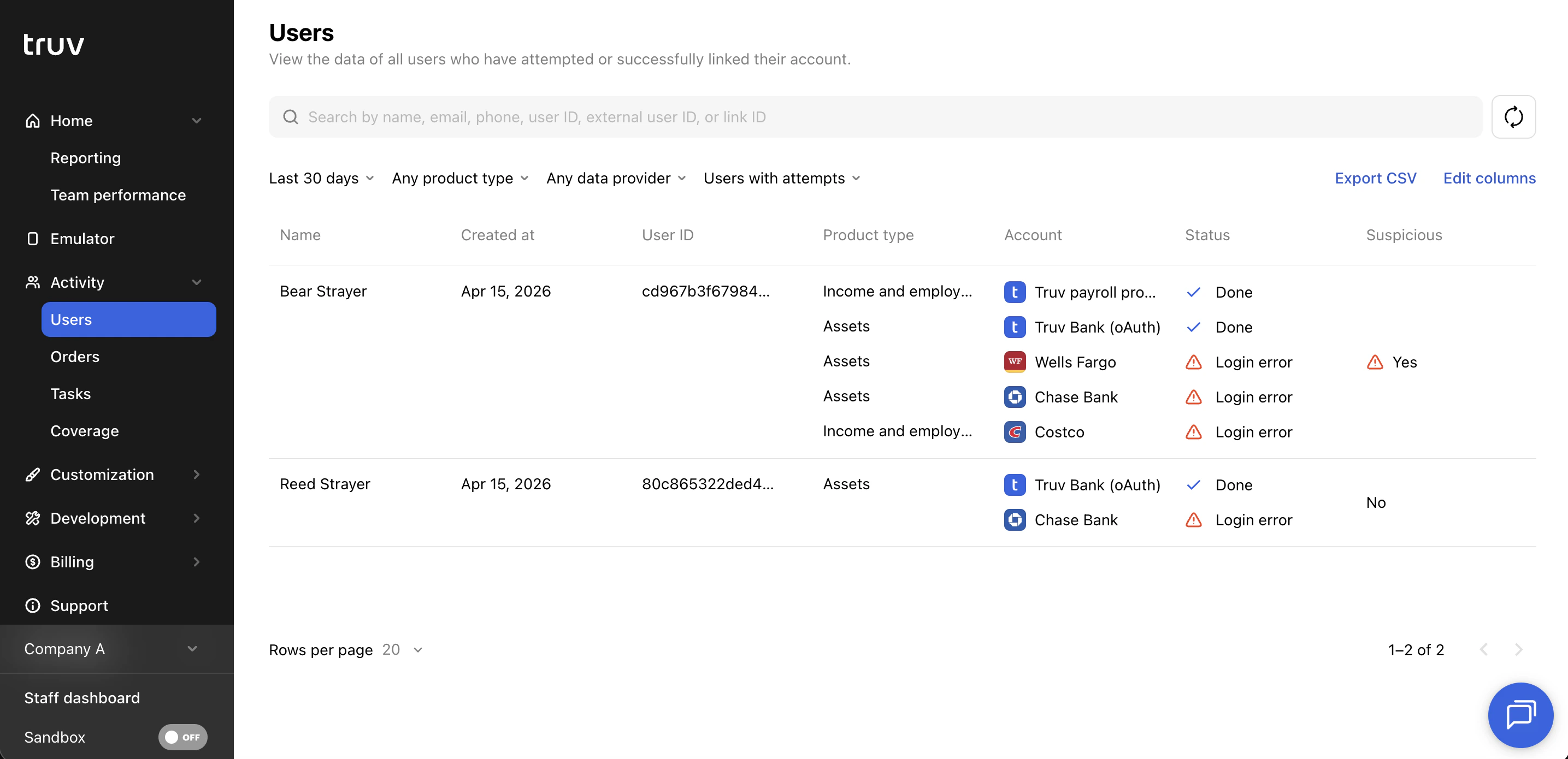
 ### Table columns
| Column | Description |
| -------------------- | ------------------------------------------------------------------------------------------------------- |
| **Name** | Applicant's full name |
| **Created at** | Date the user record was created |
| **Updated at** | Date the user record was last updated |
| **User ID** | System-generated unique identifier for the user |
| **External user ID** | Your system's identifier for the applicant, passed at user creation |
| **Email** | Applicant's email address |
| **Phone number** | Applicant's phone number |
| **SSN** | Applicant's Social Security Number |
| **Product type** | The verification product(s) associated with this user's connections |
| **Accounts (links)** | The data provider(s) the user has connected to |
| **Data source** | The type of data source used (payroll, financial accounts, document upload, etc.) |
| **Status** | Outcome status of the user's connection attempts |
| **Suspicious** | Flags users where the SSN doesn't match the provider, or uploaded documents may contain fraudulent data |
### Search and filters
| Name | Description |
| ----------------- | ------------------------------------------------------------------------------------------------------------------------------------------------- |
| **Search** | Search by name, email, phone, user ID, external user ID, or link ID |
| **Date period** | Filter by when the user was created. Presets: Last 24 hours, Last 7 days, This week, Last 30 days (default), Last 90 days, or a custom date range |
| **Product type** | Filter by the verification product associated with the user's connections |
| **Data provider** | Filter by the specific provider the user connected to |
| **Attempts** | Filter by users with attempts, users without attempts, or all users |
### Open a user
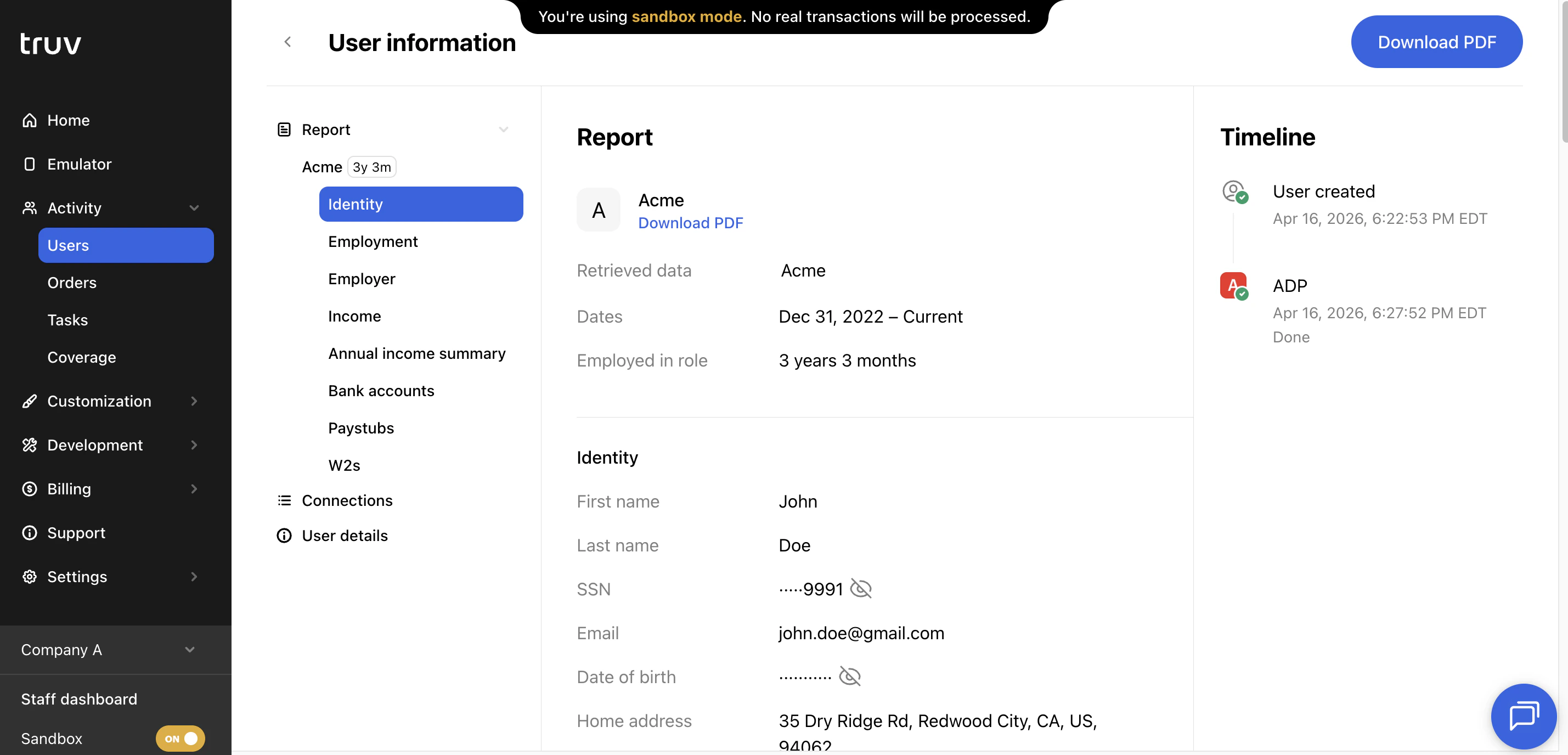
Click any user to see all reports returned across their links. Reports can be downloaded as PDFs or viewed in the Dashboard UI. Paystubs and W-2s can be downloaded directly from the report view. Additional connection details or errors can be reviewed under the Connections tab.
### Table columns
| Column | Description |
| -------------------- | ------------------------------------------------------------------------------------------------------- |
| **Name** | Applicant's full name |
| **Created at** | Date the user record was created |
| **Updated at** | Date the user record was last updated |
| **User ID** | System-generated unique identifier for the user |
| **External user ID** | Your system's identifier for the applicant, passed at user creation |
| **Email** | Applicant's email address |
| **Phone number** | Applicant's phone number |
| **SSN** | Applicant's Social Security Number |
| **Product type** | The verification product(s) associated with this user's connections |
| **Accounts (links)** | The data provider(s) the user has connected to |
| **Data source** | The type of data source used (payroll, financial accounts, document upload, etc.) |
| **Status** | Outcome status of the user's connection attempts |
| **Suspicious** | Flags users where the SSN doesn't match the provider, or uploaded documents may contain fraudulent data |
### Search and filters
| Name | Description |
| ----------------- | ------------------------------------------------------------------------------------------------------------------------------------------------- |
| **Search** | Search by name, email, phone, user ID, external user ID, or link ID |
| **Date period** | Filter by when the user was created. Presets: Last 24 hours, Last 7 days, This week, Last 30 days (default), Last 90 days, or a custom date range |
| **Product type** | Filter by the verification product associated with the user's connections |
| **Data provider** | Filter by the specific provider the user connected to |
| **Attempts** | Filter by users with attempts, users without attempts, or all users |
### Open a user
Click any user to see all reports returned across their links. Reports can be downloaded as PDFs or viewed in the Dashboard UI. Paystubs and W-2s can be downloaded directly from the report view. Additional connection details or errors can be reviewed under the Connections tab.
 ***
## Orders
The Orders tab shows every Truv verification order in your account.
***
## Orders
The Orders tab shows every Truv verification order in your account.
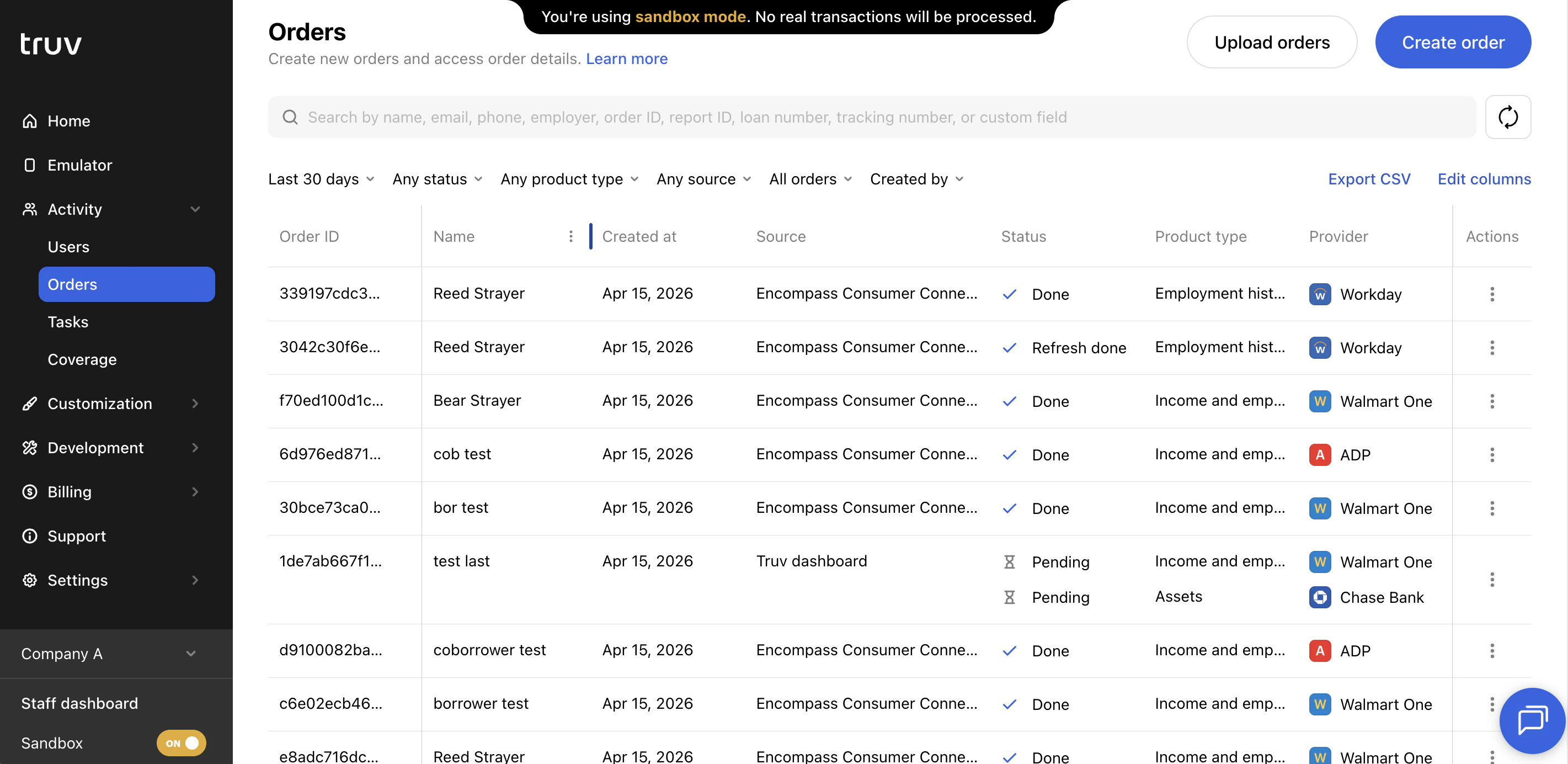 ### Table columns
| Column | Description |
| ------------------------- | -------------------------------------------------------------------------------------------------------- |
| **Name** | Applicant's full name |
| **Email** | Applicant's email address. Shows a warning if email delivery failed. |
| **Phone number** | Applicant's phone number. Shows a warning if SMS delivery failed. |
| **Created at** | Date the order was created |
| **Refreshed at** | Date a data refresh was completed on this order |
| **Source** | Where the order originated (Dashboard, API, Encompass, etc.) |
| **Created by** | Name of the order manager who created the order |
| **Created by email** | Email of the order manager who created the order |
| **Template ID** | ID of the template applied to this order |
| **Template name** | Name of the template applied to this order |
| **Loan number** | Loan number associated with this order |
| **Tracking number** | Internal tracking number for the order |
| **Loan processor name** | Name of the loan processor from the loan object |
| **Loan processor email** | Email of the loan processor from the loan object |
| **Loan originator name** | Name of the loan originator from the loan object |
| **Loan originator email** | Email of the loan originator from the loan object |
| **Custom field** | Custom field value specified during order creation |
| **AIM check report ID** | Report ID for an AIM Check (Freddie Mac) verification |
| **VOA report ID** | Report ID for a Verification of Assets report |
| **VOIE report ID** | Report ID for a Verification of Income and Employment report |
| **User ID** | ID of the applicant user associated with this order |
| **Order ID** | Unique identifier for this order |
| **Refresh order ID** | ID of the refresh order, if a refresh has been initiated |
| **Order link** | Shareable verification link sent to the applicant |
| **Status updates** | Email addresses receiving status update notifications for this order |
| **External user ID** | Your system's identifier for the applicant |
| **Product type** | The verification product(s) requested for this order |
| **Data source** | The data source used to complete the verification |
| **Provider** | The specific provider the applicant connected to |
| **Status** | Current order status (completed, pending, expired, canceled, etc.) |
| **Was attempted** | Whether the applicant opened the verification link and attempted to connect |
| **Suspicious** | Flags orders where the SSN doesn't match the provider, or uploaded documents may contain fraudulent data |
| **Notes** | Internal notes added to the order |
### Table columns
| Column | Description |
| ------------------------- | -------------------------------------------------------------------------------------------------------- |
| **Name** | Applicant's full name |
| **Email** | Applicant's email address. Shows a warning if email delivery failed. |
| **Phone number** | Applicant's phone number. Shows a warning if SMS delivery failed. |
| **Created at** | Date the order was created |
| **Refreshed at** | Date a data refresh was completed on this order |
| **Source** | Where the order originated (Dashboard, API, Encompass, etc.) |
| **Created by** | Name of the order manager who created the order |
| **Created by email** | Email of the order manager who created the order |
| **Template ID** | ID of the template applied to this order |
| **Template name** | Name of the template applied to this order |
| **Loan number** | Loan number associated with this order |
| **Tracking number** | Internal tracking number for the order |
| **Loan processor name** | Name of the loan processor from the loan object |
| **Loan processor email** | Email of the loan processor from the loan object |
| **Loan originator name** | Name of the loan originator from the loan object |
| **Loan originator email** | Email of the loan originator from the loan object |
| **Custom field** | Custom field value specified during order creation |
| **AIM check report ID** | Report ID for an AIM Check (Freddie Mac) verification |
| **VOA report ID** | Report ID for a Verification of Assets report |
| **VOIE report ID** | Report ID for a Verification of Income and Employment report |
| **User ID** | ID of the applicant user associated with this order |
| **Order ID** | Unique identifier for this order |
| **Refresh order ID** | ID of the refresh order, if a refresh has been initiated |
| **Order link** | Shareable verification link sent to the applicant |
| **Status updates** | Email addresses receiving status update notifications for this order |
| **External user ID** | Your system's identifier for the applicant |
| **Product type** | The verification product(s) requested for this order |
| **Data source** | The data source used to complete the verification |
| **Provider** | The specific provider the applicant connected to |
| **Status** | Current order status (completed, pending, expired, canceled, etc.) |
| **Was attempted** | Whether the applicant opened the verification link and attempted to connect |
| **Suspicious** | Flags orders where the SSN doesn't match the provider, or uploaded documents may contain fraudulent data |
| **Notes** | Internal notes added to the order |
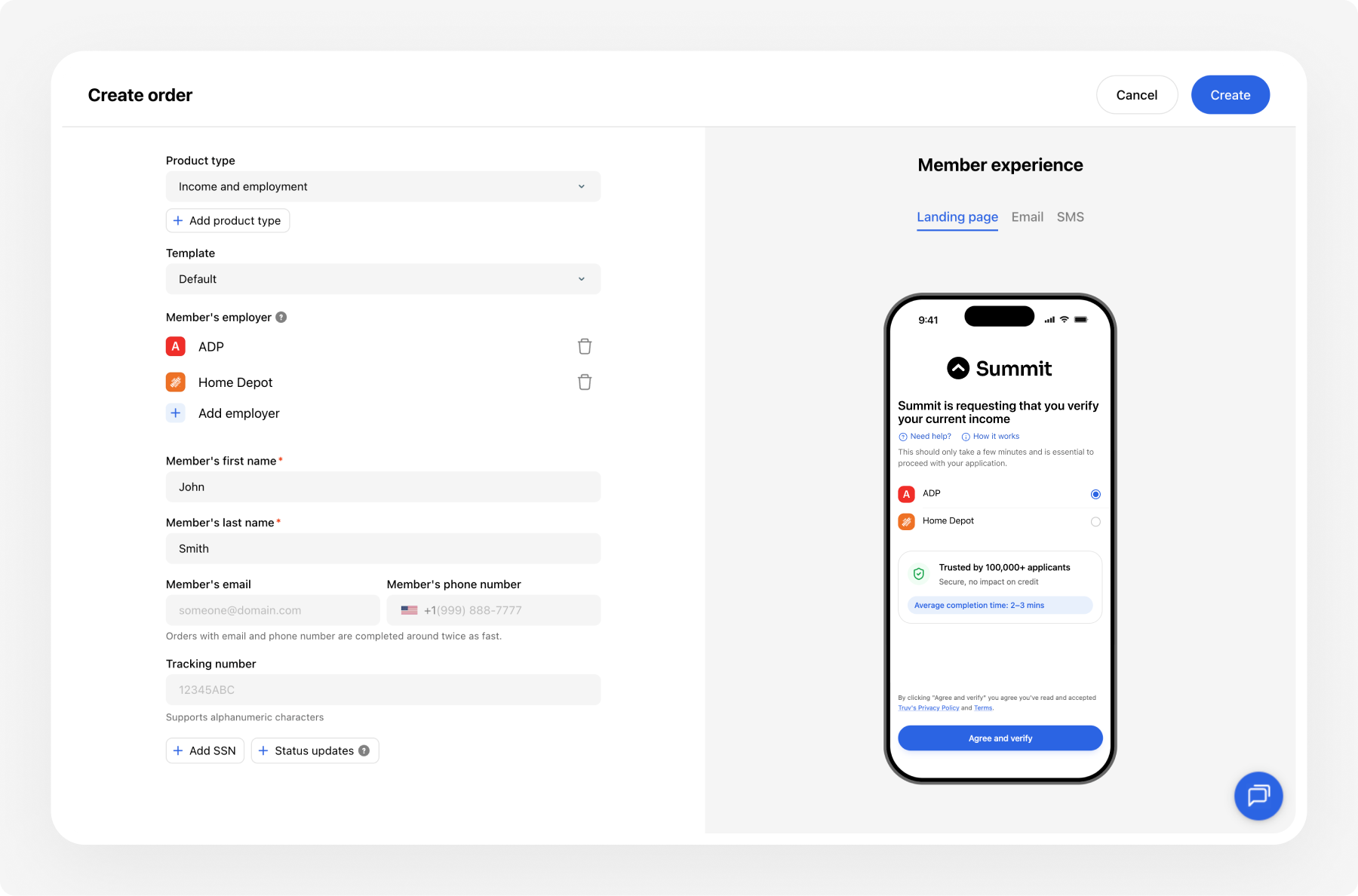
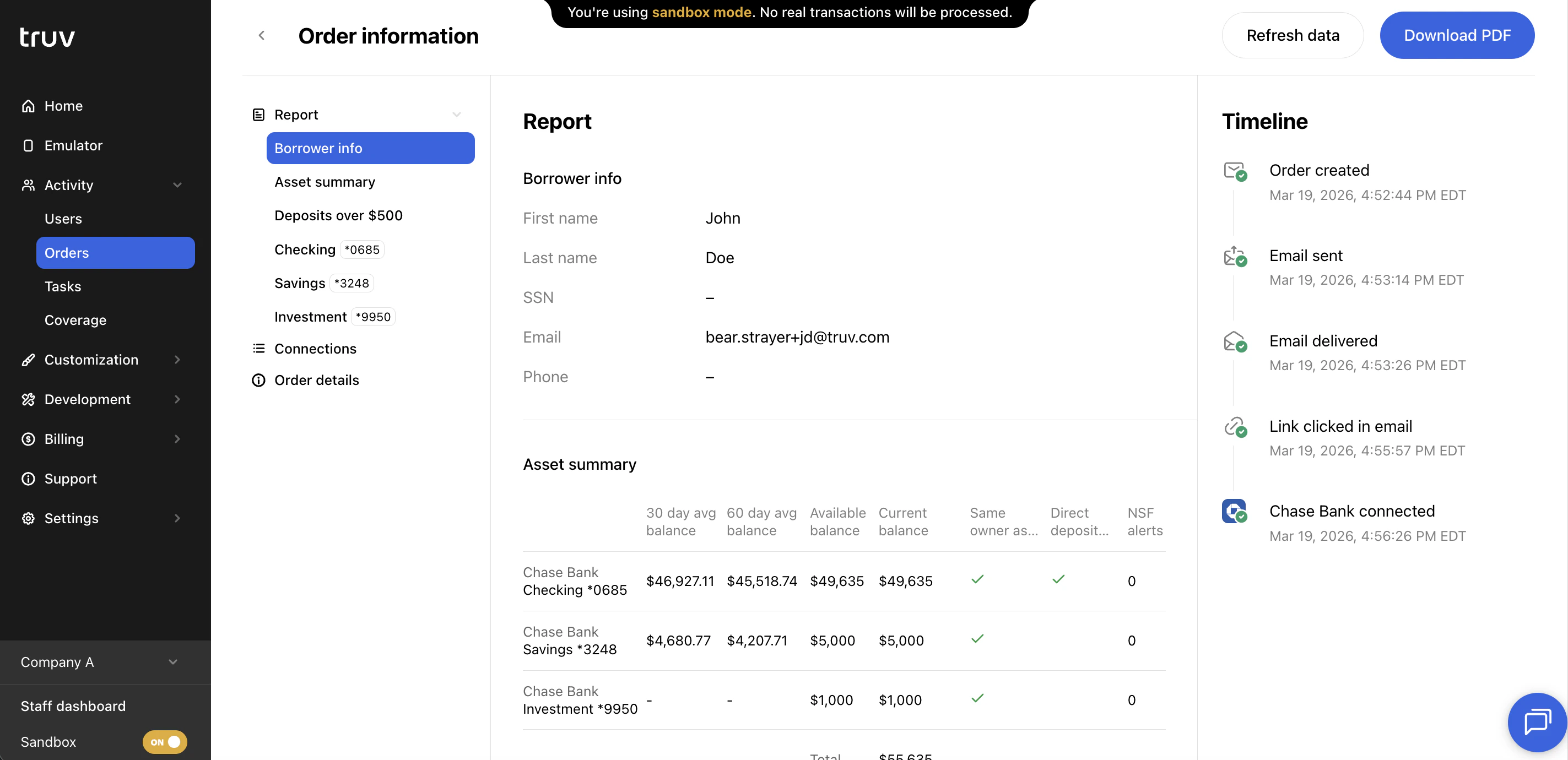 ### Create an order
 ### Table columns
| Column | Description |
| ----------------- | ------------------------------------------------------------------------------------------------------- |
| **Created at** | Date and time the connection attempt was made |
| **Data source** | The type of data source used (payroll, financial accounts, document upload, etc.) |
| **Data provider** | The specific provider the applicant attempted to connect to |
| **Task ID** | Unique identifier for this connection attempt |
| **Link ID** | ID of the link (account connection) this task belongs to |
| **Status** | Outcome of the connection attempt (done, login error, MFA error, etc.) |
| **Suspicious** | Flags tasks where the SSN doesn't match the provider, or uploaded documents may contain fraudulent data |
| **Product type** | The verification product associated with this task |
| **Tracking info** | Tracking identifier passed through from the order or bridge token |
| **Bridge token** | The bridge token used to initialize this connection attempt |
| **User ID** | ID of the applicant user associated with this task |
### Search and filters
| Name | Description |
| ----------------- | -------------------------------------------------------------------------------------------------------------------------------------------------- |
| **Search** | Search by task ID, link ID, user ID, order ID, bridge token, or tracking info |
| **Date period** | Filter by when the task was created. Presets: Last 24 hours, Last 7 days, This week, Last 30 days (default), Last 90 days, or a custom date range |
| **Status** | Filter by task outcome: Done, Error, Login Error, Account Locked, MFA Error, Config Error, No Data, Unavailable, Unable to Reset, or Not Supported |
| **Product type** | Filter by the verification product associated with the task |
| **Data provider** | Filter by the specific provider the applicant attempted to connect to |
### Open a task
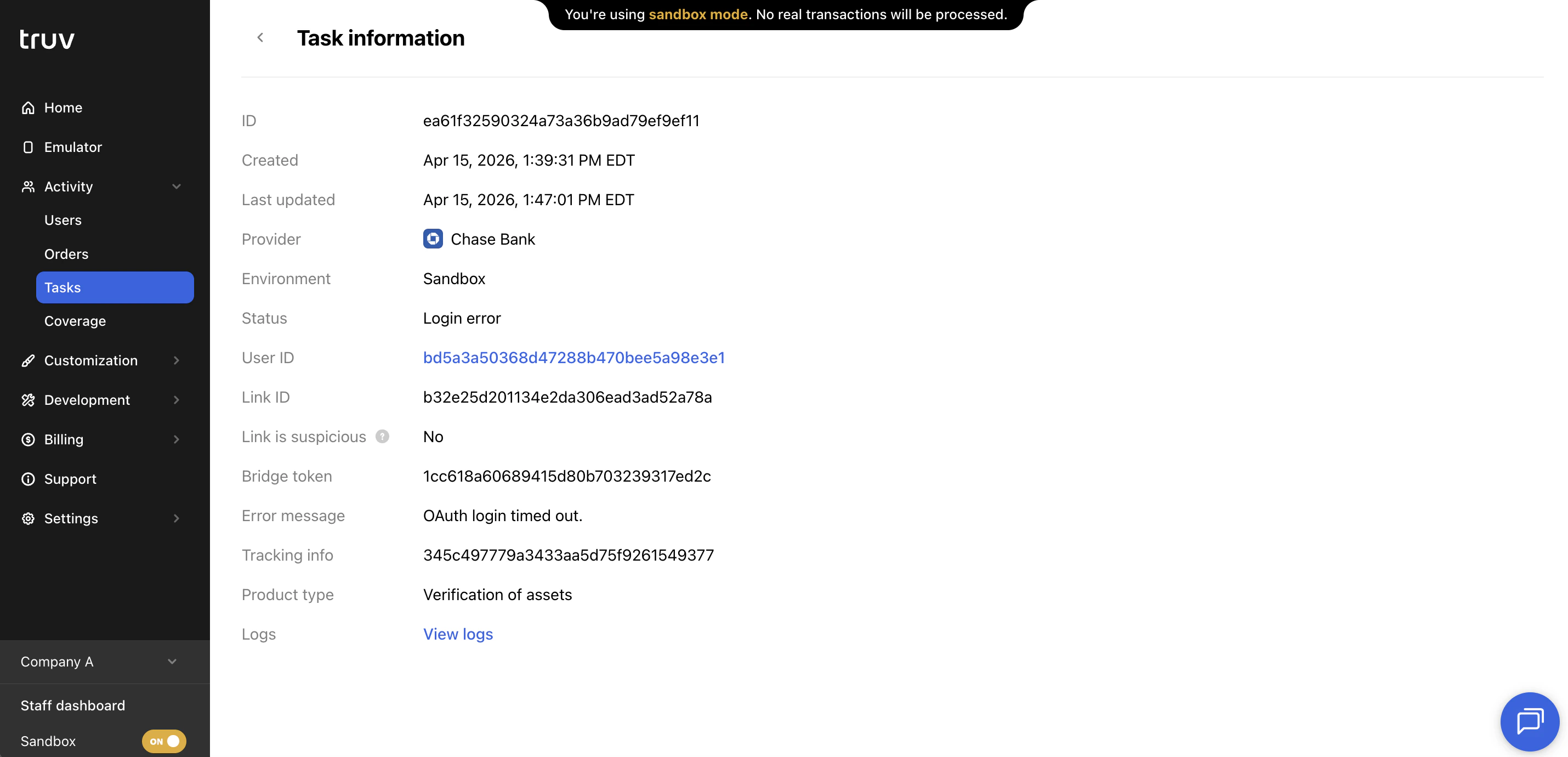
Click any task row to open the task detail. The detail view shows:
| Field | Description |
| ---------------------- | ----------------------------------------------------------------- |
| **ID** | Unique identifier for this task |
| **Created** | Timestamp when the connection attempt was initiated |
| **Last updated** | Timestamp when the task was last updated |
| **Provider** | The data provider the applicant attempted to connect to |
| **Environment** | Sandbox or Production |
| **Status** | Outcome of the connection attempt (e.g., Done, Login error) |
| **User ID** | Links to the associated user record |
| **Link ID** | ID of the link this task belongs to |
| **Link is suspicious** | Whether the link was flagged for potential fraud |
| **Bridge token** | The bridge token used to initialize this connection |
| **Error message** | Details about any error that occurred during the attempt |
| **Tracking info** | Tracking identifier passed through from the order or bridge token |
| **Product type** | The verification product associated with this task |
| **Logs** | Link to view raw connection logs for debugging |
### Table columns
| Column | Description |
| ----------------- | ------------------------------------------------------------------------------------------------------- |
| **Created at** | Date and time the connection attempt was made |
| **Data source** | The type of data source used (payroll, financial accounts, document upload, etc.) |
| **Data provider** | The specific provider the applicant attempted to connect to |
| **Task ID** | Unique identifier for this connection attempt |
| **Link ID** | ID of the link (account connection) this task belongs to |
| **Status** | Outcome of the connection attempt (done, login error, MFA error, etc.) |
| **Suspicious** | Flags tasks where the SSN doesn't match the provider, or uploaded documents may contain fraudulent data |
| **Product type** | The verification product associated with this task |
| **Tracking info** | Tracking identifier passed through from the order or bridge token |
| **Bridge token** | The bridge token used to initialize this connection attempt |
| **User ID** | ID of the applicant user associated with this task |
### Search and filters
| Name | Description |
| ----------------- | -------------------------------------------------------------------------------------------------------------------------------------------------- |
| **Search** | Search by task ID, link ID, user ID, order ID, bridge token, or tracking info |
| **Date period** | Filter by when the task was created. Presets: Last 24 hours, Last 7 days, This week, Last 30 days (default), Last 90 days, or a custom date range |
| **Status** | Filter by task outcome: Done, Error, Login Error, Account Locked, MFA Error, Config Error, No Data, Unavailable, Unable to Reset, or Not Supported |
| **Product type** | Filter by the verification product associated with the task |
| **Data provider** | Filter by the specific provider the applicant attempted to connect to |
### Open a task
Click any task row to open the task detail. The detail view shows:
| Field | Description |
| ---------------------- | ----------------------------------------------------------------- |
| **ID** | Unique identifier for this task |
| **Created** | Timestamp when the connection attempt was initiated |
| **Last updated** | Timestamp when the task was last updated |
| **Provider** | The data provider the applicant attempted to connect to |
| **Environment** | Sandbox or Production |
| **Status** | Outcome of the connection attempt (e.g., Done, Login error) |
| **User ID** | Links to the associated user record |
| **Link ID** | ID of the link this task belongs to |
| **Link is suspicious** | Whether the link was flagged for potential fraud |
| **Bridge token** | The bridge token used to initialize this connection |
| **Error message** | Details about any error that occurred during the attempt |
| **Tracking info** | Tracking identifier passed through from the order or bridge token |
| **Product type** | The verification product associated with this task |
| **Logs** | Link to view raw connection logs for debugging |
 ### Export
Like Users and Orders, the Tasks table can be exported as a CSV with all active filters and columns applied.
***
## Coverage
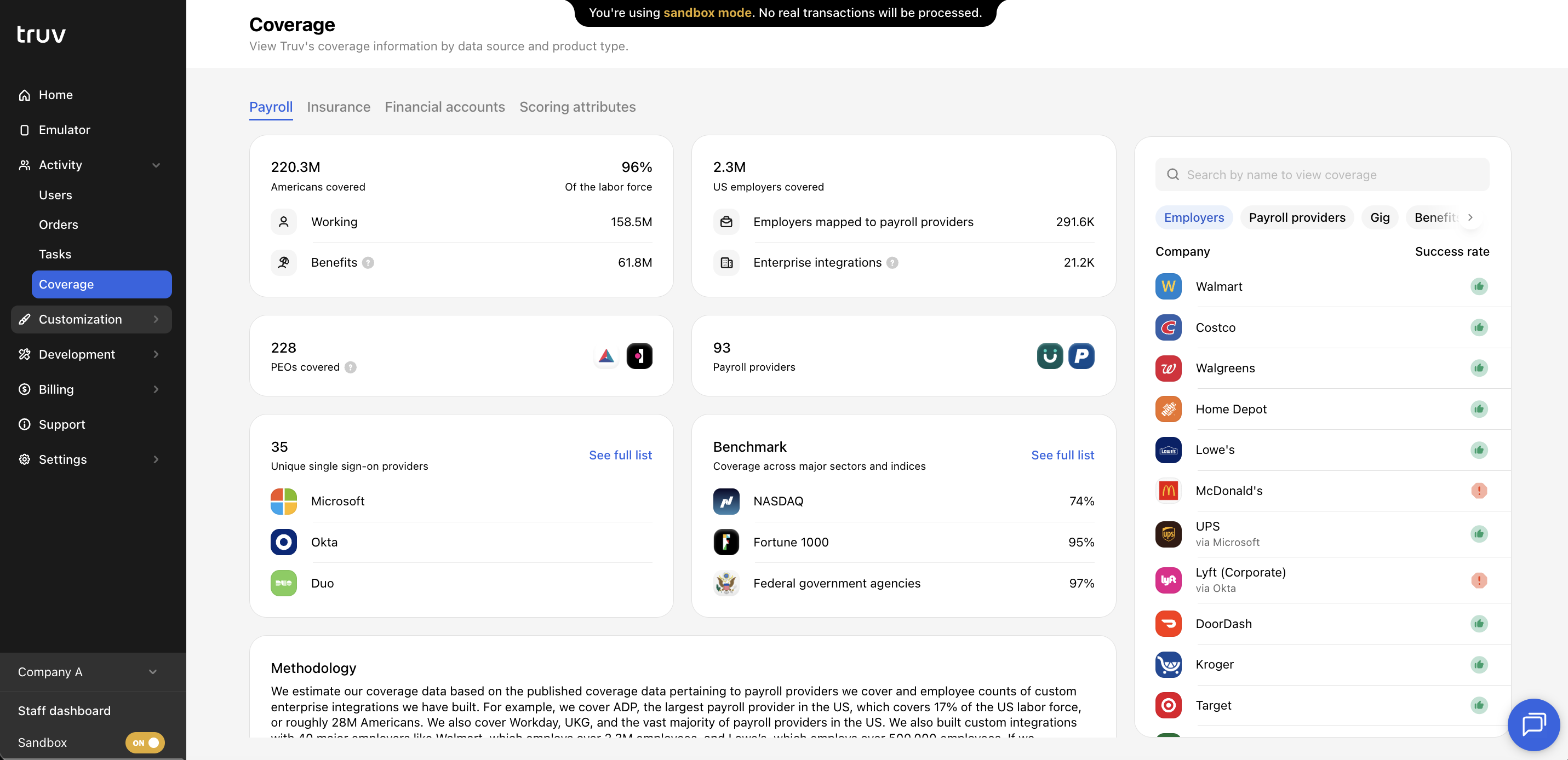
The Coverage tab shows Truv's provider coverage across four product categories:
* **Payroll**
* **Insurance**
* **Financial Accounts**
* **Scoring Attributes**
### Export
Like Users and Orders, the Tasks table can be exported as a CSV with all active filters and columns applied.
***
## Coverage
The Coverage tab shows Truv's provider coverage across four product categories:
* **Payroll**
* **Insurance**
* **Financial Accounts**
* **Scoring Attributes**
 ### Provider search
In the Payroll and Financial Accounts categories, search for a specific employer, payroll provider, or financial institution to see:
* Whether the provider is covered by Truv
* The historical connection success rate for that provider
### Provider search
In the Payroll and Financial Accounts categories, search for a specific employer, payroll provider, or financial institution to see:
* Whether the provider is covered by Truv
* The historical connection success rate for that provider
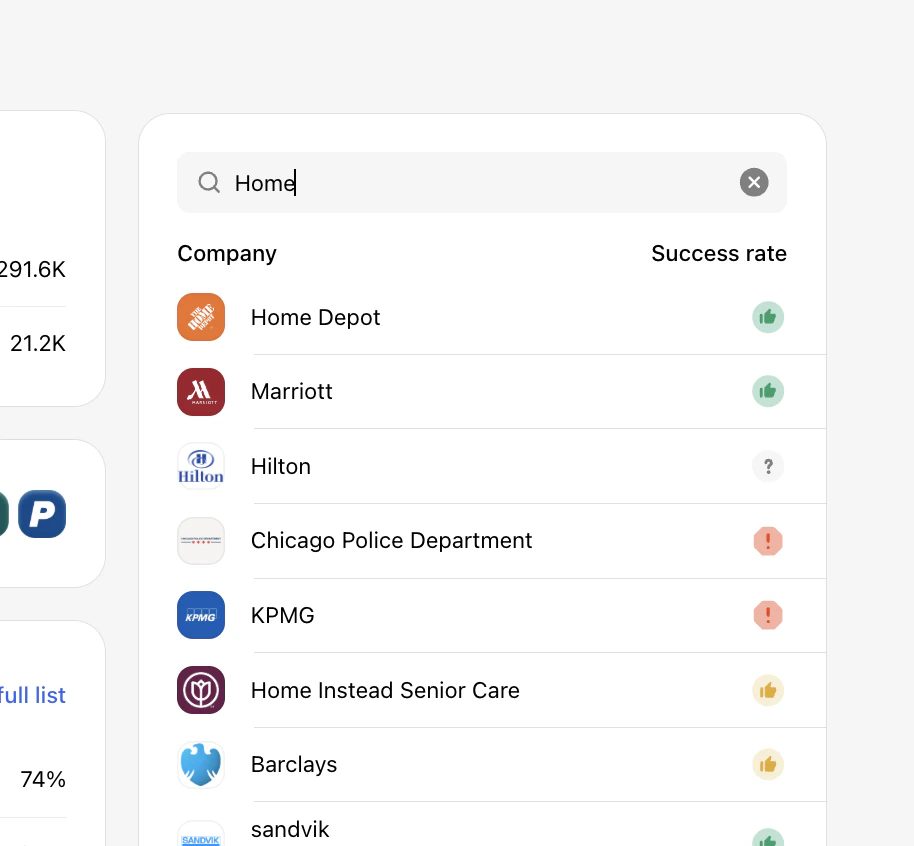 Each result displays a success rate indicator. The icon shown reflects Truv's historical connection data for that provider:
| Icon | Rating | Payroll | Financial accounts |
|---|---|---|---|
|
|
High | Expected to succeed, send the verification order. | Expected to succeed, send the verification order. |
|
|
Low | May succeed, send if the user knows their payroll provider and is confident. | May succeed, send if the user is confident and knows their login credentials. |
|
|
Unsupported | Verification via payroll is not feasible. Try Truv's Document Upload solution or the next step in your waterfall as an alternative. | Verification with this financial institution is not supported, use an alternative method. |
|
|
Unknown | Not enough attempts to determine success. May succeed if the user knows their payroll provider and it's supported by Truv. | Not enough attempts to determine success. Likely to succeed based on other financial institutions. |