> ## Documentation Index
> Fetch the complete documentation index at: https://docs.truv.com/llms.txt
> Use this file to discover all available pages before exploring further.
# Consumer Credit
> Income and asset verification for auto loans, personal loans, and credit decisioning
Truv helps consumer lenders verify borrower income and assets instantly, improving approval rates and reducing fraud.
Real-time income verification for instant approvals
Verify income for thin-file borrowers
Direct data prevents document falsification
No document uploads needed
***
## Quick start
Run a demo app to see Truv in action, then follow the integration guide to build it into your workflow.
Payroll-first with automatic document fallback
Transaction-based income verification
Direct payroll connection for income data
Automatic loan repayment from paycheck
***
## What you can verify
* Current income
* Employment status
* Pay frequency
* YTD earnings
* Bank balances
* Account ownership
* Transaction patterns
* Cash flow analysis
* Income deposits
* Spending patterns
***
## Use cases
Verify income for vehicle financing:
* New and used car loans
* Refinancing
* Lease buyouts
**Products:** Income & Employment, Assets
Income verification for unsecured lending:
* Debt consolidation
* Home improvement loans
* Emergency expenses
**Products:** Income & Employment, Assets
Income verification for credit limit decisions:
* New account applications
* Credit limit increases
* Risk assessment
**Products:** Income & Employment
Quick income checks for BNPL:
* Point-of-sale financing
* Installment plans
* Higher-ticket items
**Products:** Income & Employment
***
## Integration options
### Option 1: Dashboard (No Code)
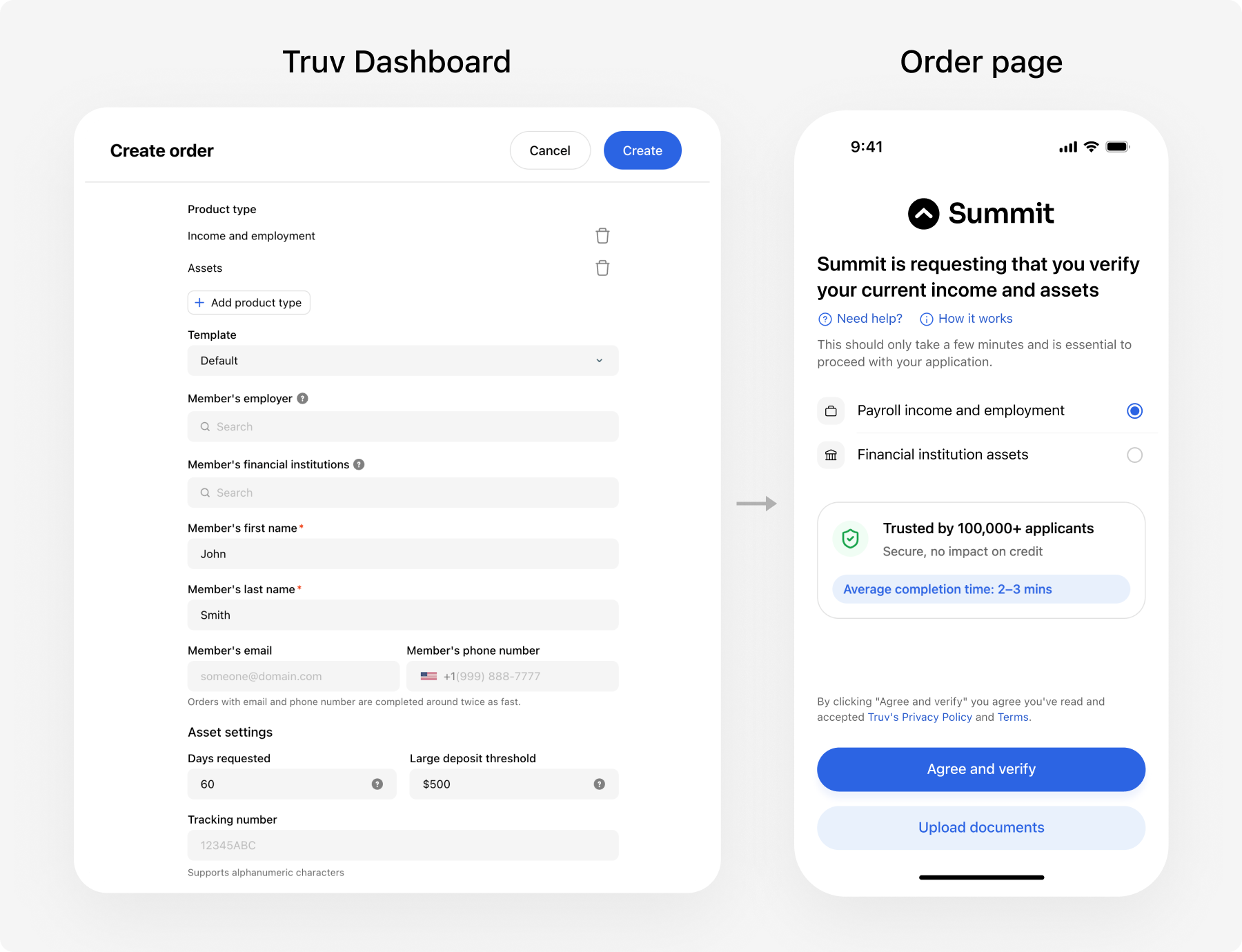 Use the Truv Dashboard to create and manage verification orders without any integration:
* Create orders manually via the Dashboard UI
* Send verification links to borrowers via email/SMS
* View results directly in the Dashboard
* Optionally add webhooks to sync data to your loan origination system
[Learn more about Dashboard integration -->](/developers/dashboard)
### Option 2: Embedded Orders (Recommended)
Use the Truv Dashboard to create and manage verification orders without any integration:
* Create orders manually via the Dashboard UI
* Send verification links to borrowers via email/SMS
* View results directly in the Dashboard
* Optionally add webhooks to sync data to your loan origination system
[Learn more about Dashboard integration -->](/developers/dashboard)
### Option 2: Embedded Orders (Recommended)
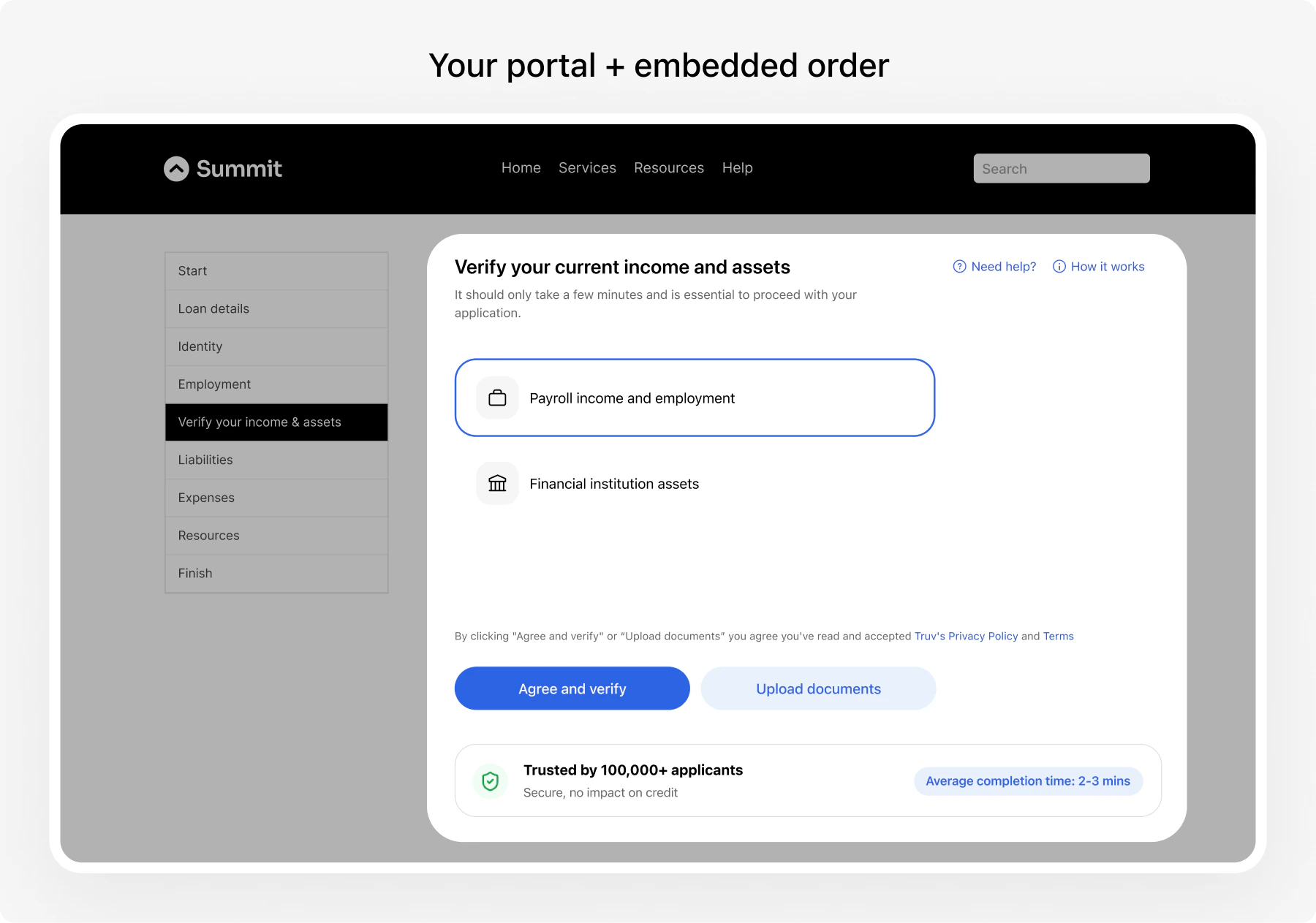 For custom implementations or automated lending workflows:
Payroll-first with automatic document fallback
Transaction-based income verification
Direct payroll connection for income data
Automatic loan repayment from paycheck
***
## Implementation timeline
| Integration Method | Timeline | Code Required |
| ------------------- | --------- | ------------- |
| **Dashboard** | Same day | None |
| **Embedded Orders** | 2-4 weeks | Minimal |
***
## Get started
* Quick start with no code? --> [Dashboard Integration](/developers/dashboard)
* Building custom? --> Choose an integration from the [Quick start](#quick-start) section above
Clone the [demo apps repo](https://github.com/truvhq/demo-apps) and run a demo to see the verification flow end-to-end.
Test with various borrower scenarios
Start verifying borrower income instantly
***
## Next steps
Payroll-first with document fallback
Complete API documentation
Implementation guidelines
Talk to our lending solutions team
For custom implementations or automated lending workflows:
Payroll-first with automatic document fallback
Transaction-based income verification
Direct payroll connection for income data
Automatic loan repayment from paycheck
***
## Implementation timeline
| Integration Method | Timeline | Code Required |
| ------------------- | --------- | ------------- |
| **Dashboard** | Same day | None |
| **Embedded Orders** | 2-4 weeks | Minimal |
***
## Get started
* Quick start with no code? --> [Dashboard Integration](/developers/dashboard)
* Building custom? --> Choose an integration from the [Quick start](#quick-start) section above
Clone the [demo apps repo](https://github.com/truvhq/demo-apps) and run a demo to see the verification flow end-to-end.
Test with various borrower scenarios
Start verifying borrower income instantly
***
## Next steps
Payroll-first with document fallback
Complete API documentation
Implementation guidelines
Talk to our lending solutions team