> ## Documentation Index
> Fetch the complete documentation index at: https://docs.truv.com/llms.txt
> Use this file to discover all available pages before exploring further.
# Data Structure
> How Truv's core objects (Orders, Users, Links, and Tasks) relate to each other
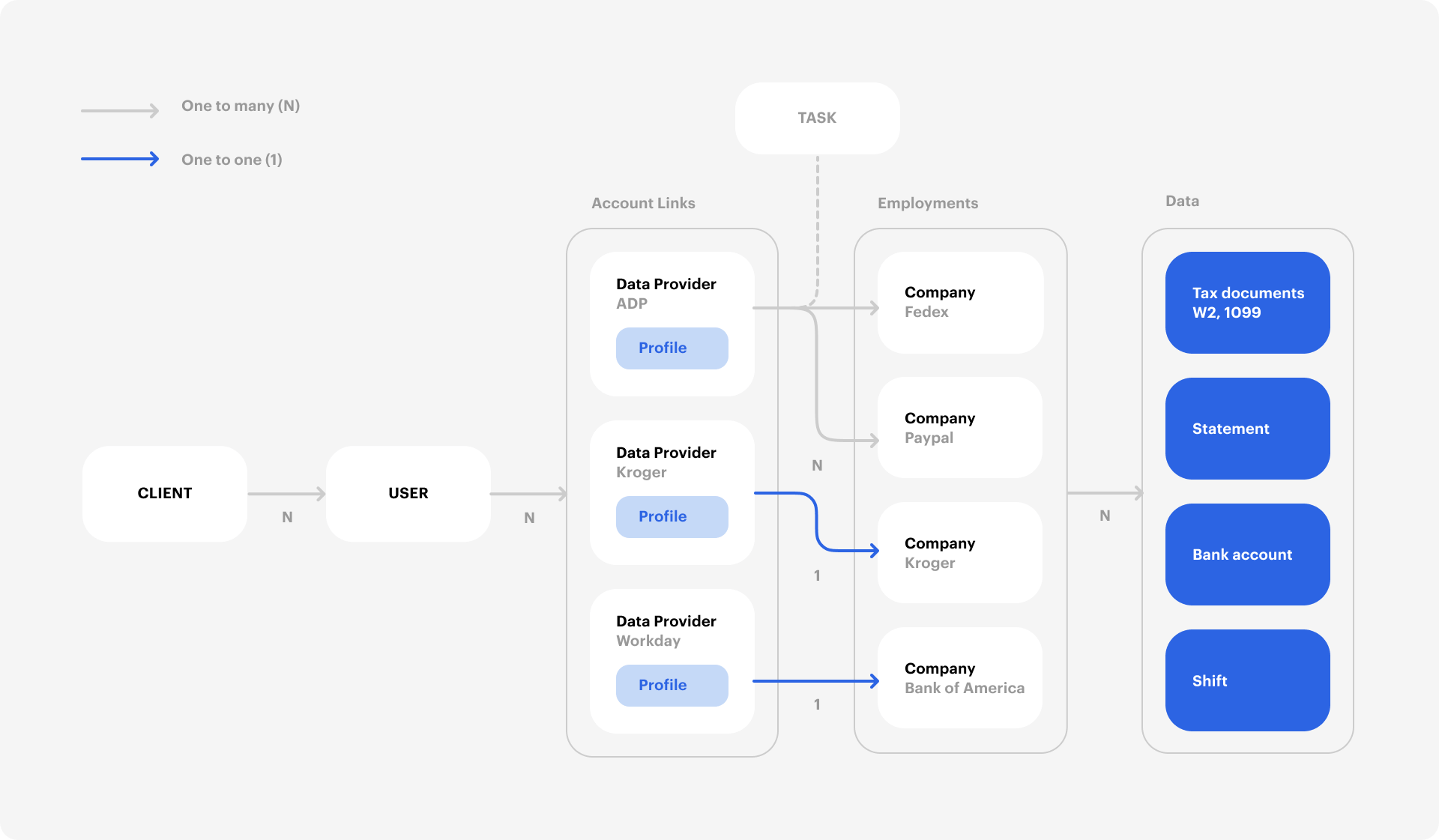
The Truv API is built around four core objects: **Orders**, **Users**, **Links**, and **Tasks**. Understanding how they connect is essential before integrating.
 ## Object relationships
Every verification follows the same path through these objects:
1. **Order → User.** You create an [Order](/api-reference/orders/object) with the applicant's details. Truv automatically creates a [User](/api-reference/users/object), generates a Bridge Token, and builds a landing page with a unique `share_url`. You can also create Users directly via the API if you manage your own frontend flow.
2. **User → Bridge Token.** A [Bridge Token](/api-reference/bridge-token/users_tokens) is a short-lived credential scoped to a single User. It controls which products the User can access, supports [deeplinking](/developers/integration/embedded-orders/deeplinking) to pre-select a provider, and sets the customization template. Pass it to your frontend to initialize Truv Bridge.
3. **Bridge Token → Link.** When the User authenticates with a data provider (payroll system, bank, or tax portal) through Truv Bridge, the system creates a [Link](/api-reference/links/object), a persistent connection to that provider. The Link has an `access_token` for all subsequent data operations. If the same User reconnects with the same credentials to the same provider, Truv returns the existing Link rather than creating a duplicate.
4. **Link → Task.** Each data retrieval or action through a Link is a [Task](/api-reference/tasks/object): fetching income data, switching a direct deposit, or refreshing stale data. A single Link can have multiple Tasks over its lifetime.
5. **Task → Data.** When a Task completes successfully, the verification data becomes available through the Link's data endpoints. Listen for `task-status-updated` [webhooks](/api-reference/webhooks) to know when data is ready.
For the simplest integration, create an Order and let Truv handle everything: User creation, Bridge Token generation, and invite delivery. Use the lower-level User and Bridge Token APIs only when you need full control over the frontend experience.
***
## Orders
An [Order](/api-reference/orders/object) is the starting point for every verification. Creating an Order automatically creates a User, generates a Bridge Token, and produces a landing page for the user to connect their account.
## Users
A [User](/api-reference/users/object) represents a person connecting their accounts through Truv Bridge. Each User can have multiple Links across different providers, and each Link carries its own `access_token`, so a User with multiple connections has multiple access\_tokens.
## Links
A [Link](/api-reference/links/object) is a persistent connection to a data provider for a specific User. Reusing the same credentials for the same provider returns the same Link.
## Tasks
A [Task](/api-reference/tasks/object) is an individual action performed through a Link: fetching verification data, switching direct deposits, or refreshing a connection. Each Task progresses through a defined status flow from `new` to `done` or `error`. See [Task Lifecycle](/api-reference/tasks/lifecycle) for the full status diagram, processing times, and error handling.
## Data retrieval by source
After a Task completes, the endpoint you use to retrieve data depends on the `data_source` value on the employer or financial account suborder.
| `data_source` | Description | Retrieval endpoint |
| -------------------- | ------------------------------ | -------------------------------------------------------------------------------------------------------------------------------------------------- |
| `payroll` | Payroll provider parsing | `GET /v1/links/{link_id}/income/report/` for income data, `GET /v1/links/{link_id}/employment/report/` for employment-only data |
| `docs` | User-uploaded documents | Pre-signed URLs returned in the document upload response. Access the `file` field on each statement or W-2 object. |
| `financial_accounts` | Bank account data (VOA) | `POST /v1/users/{user_id}/assets/reports/` to generate an asset report, or use the income insights endpoints for transaction-based income analysis |
| `insurance` | Insurance provider data | Retrieved through the insurance suborder on the Order object |
| `tax` | Tax documents | Retrieved through the tax document endpoints on the Link |
| `scoring_attributes` | Transaction scoring attributes | Retrieved through the scoring attributes report endpoints |
For `payroll` sources, the `income` product automatically includes employment data. You do not need to make a separate employment request if you already requested income.
***
## Field constraints
Numeric fields across Truv's API use a consistent precision format. All monetary and quantity fields are stored as `DecimalField(max_digits=12, decimal_places=2)`, meaning up to 10 digits before the decimal point and exactly 2 digits after.
| Field | Object | Format | Max value |
| --------------- | -------------------------------------- | -------------------------------- | --------------- |
| `gross_pay` | Statements, Annual income summary, W2s | Decimal string, 2 decimal places | `9999999999.99` |
| `net_pay` | Statements, Annual income summary | Decimal string, 2 decimal places | `9999999999.99` |
| `hours` | Statements | Decimal string, 2 decimal places | `9999999999.99` |
| `income` | Employments | Decimal string, 2 decimal places | `9999999999.99` |
| `pay_rate` | Employments | Decimal string, 2 decimal places | `9999999999.99` |
| `bonus` | Statements, Annual income summary | Decimal string, 2 decimal places | `9999999999.99` |
| `commission` | Statements, Annual income summary | Decimal string, 2 decimal places | `9999999999.99` |
| `overtime` | Statements, Annual income summary | Decimal string, 2 decimal places | `9999999999.99` |
| `regular` | Statements, Annual income summary | Decimal string, 2 decimal places | `9999999999.99` |
| `other_pay` | Statements, Annual income summary | Decimal string, 2 decimal places | `9999999999.99` |
| `deposit_value` | Bank accounts | Decimal string, 2 decimal places | `9999999999.99` |
| `wages` | W2s | Decimal string, 2 decimal places | `9999999999.99` |
All numeric values are returned as **strings** (e.g., `"70000.00"`), not as JSON numbers. Parse them as decimals in your application to avoid floating-point precision issues.
## Object relationships
Every verification follows the same path through these objects:
1. **Order → User.** You create an [Order](/api-reference/orders/object) with the applicant's details. Truv automatically creates a [User](/api-reference/users/object), generates a Bridge Token, and builds a landing page with a unique `share_url`. You can also create Users directly via the API if you manage your own frontend flow.
2. **User → Bridge Token.** A [Bridge Token](/api-reference/bridge-token/users_tokens) is a short-lived credential scoped to a single User. It controls which products the User can access, supports [deeplinking](/developers/integration/embedded-orders/deeplinking) to pre-select a provider, and sets the customization template. Pass it to your frontend to initialize Truv Bridge.
3. **Bridge Token → Link.** When the User authenticates with a data provider (payroll system, bank, or tax portal) through Truv Bridge, the system creates a [Link](/api-reference/links/object), a persistent connection to that provider. The Link has an `access_token` for all subsequent data operations. If the same User reconnects with the same credentials to the same provider, Truv returns the existing Link rather than creating a duplicate.
4. **Link → Task.** Each data retrieval or action through a Link is a [Task](/api-reference/tasks/object): fetching income data, switching a direct deposit, or refreshing stale data. A single Link can have multiple Tasks over its lifetime.
5. **Task → Data.** When a Task completes successfully, the verification data becomes available through the Link's data endpoints. Listen for `task-status-updated` [webhooks](/api-reference/webhooks) to know when data is ready.
For the simplest integration, create an Order and let Truv handle everything: User creation, Bridge Token generation, and invite delivery. Use the lower-level User and Bridge Token APIs only when you need full control over the frontend experience.
***
## Orders
An [Order](/api-reference/orders/object) is the starting point for every verification. Creating an Order automatically creates a User, generates a Bridge Token, and produces a landing page for the user to connect their account.
## Users
A [User](/api-reference/users/object) represents a person connecting their accounts through Truv Bridge. Each User can have multiple Links across different providers, and each Link carries its own `access_token`, so a User with multiple connections has multiple access\_tokens.
## Links
A [Link](/api-reference/links/object) is a persistent connection to a data provider for a specific User. Reusing the same credentials for the same provider returns the same Link.
## Tasks
A [Task](/api-reference/tasks/object) is an individual action performed through a Link: fetching verification data, switching direct deposits, or refreshing a connection. Each Task progresses through a defined status flow from `new` to `done` or `error`. See [Task Lifecycle](/api-reference/tasks/lifecycle) for the full status diagram, processing times, and error handling.
## Data retrieval by source
After a Task completes, the endpoint you use to retrieve data depends on the `data_source` value on the employer or financial account suborder.
| `data_source` | Description | Retrieval endpoint |
| -------------------- | ------------------------------ | -------------------------------------------------------------------------------------------------------------------------------------------------- |
| `payroll` | Payroll provider parsing | `GET /v1/links/{link_id}/income/report/` for income data, `GET /v1/links/{link_id}/employment/report/` for employment-only data |
| `docs` | User-uploaded documents | Pre-signed URLs returned in the document upload response. Access the `file` field on each statement or W-2 object. |
| `financial_accounts` | Bank account data (VOA) | `POST /v1/users/{user_id}/assets/reports/` to generate an asset report, or use the income insights endpoints for transaction-based income analysis |
| `insurance` | Insurance provider data | Retrieved through the insurance suborder on the Order object |
| `tax` | Tax documents | Retrieved through the tax document endpoints on the Link |
| `scoring_attributes` | Transaction scoring attributes | Retrieved through the scoring attributes report endpoints |
For `payroll` sources, the `income` product automatically includes employment data. You do not need to make a separate employment request if you already requested income.
***
## Field constraints
Numeric fields across Truv's API use a consistent precision format. All monetary and quantity fields are stored as `DecimalField(max_digits=12, decimal_places=2)`, meaning up to 10 digits before the decimal point and exactly 2 digits after.
| Field | Object | Format | Max value |
| --------------- | -------------------------------------- | -------------------------------- | --------------- |
| `gross_pay` | Statements, Annual income summary, W2s | Decimal string, 2 decimal places | `9999999999.99` |
| `net_pay` | Statements, Annual income summary | Decimal string, 2 decimal places | `9999999999.99` |
| `hours` | Statements | Decimal string, 2 decimal places | `9999999999.99` |
| `income` | Employments | Decimal string, 2 decimal places | `9999999999.99` |
| `pay_rate` | Employments | Decimal string, 2 decimal places | `9999999999.99` |
| `bonus` | Statements, Annual income summary | Decimal string, 2 decimal places | `9999999999.99` |
| `commission` | Statements, Annual income summary | Decimal string, 2 decimal places | `9999999999.99` |
| `overtime` | Statements, Annual income summary | Decimal string, 2 decimal places | `9999999999.99` |
| `regular` | Statements, Annual income summary | Decimal string, 2 decimal places | `9999999999.99` |
| `other_pay` | Statements, Annual income summary | Decimal string, 2 decimal places | `9999999999.99` |
| `deposit_value` | Bank accounts | Decimal string, 2 decimal places | `9999999999.99` |
| `wages` | W2s | Decimal string, 2 decimal places | `9999999999.99` |
All numeric values are returned as **strings** (e.g., `"70000.00"`), not as JSON numbers. Parse them as decimals in your application to avoid floating-point precision issues.